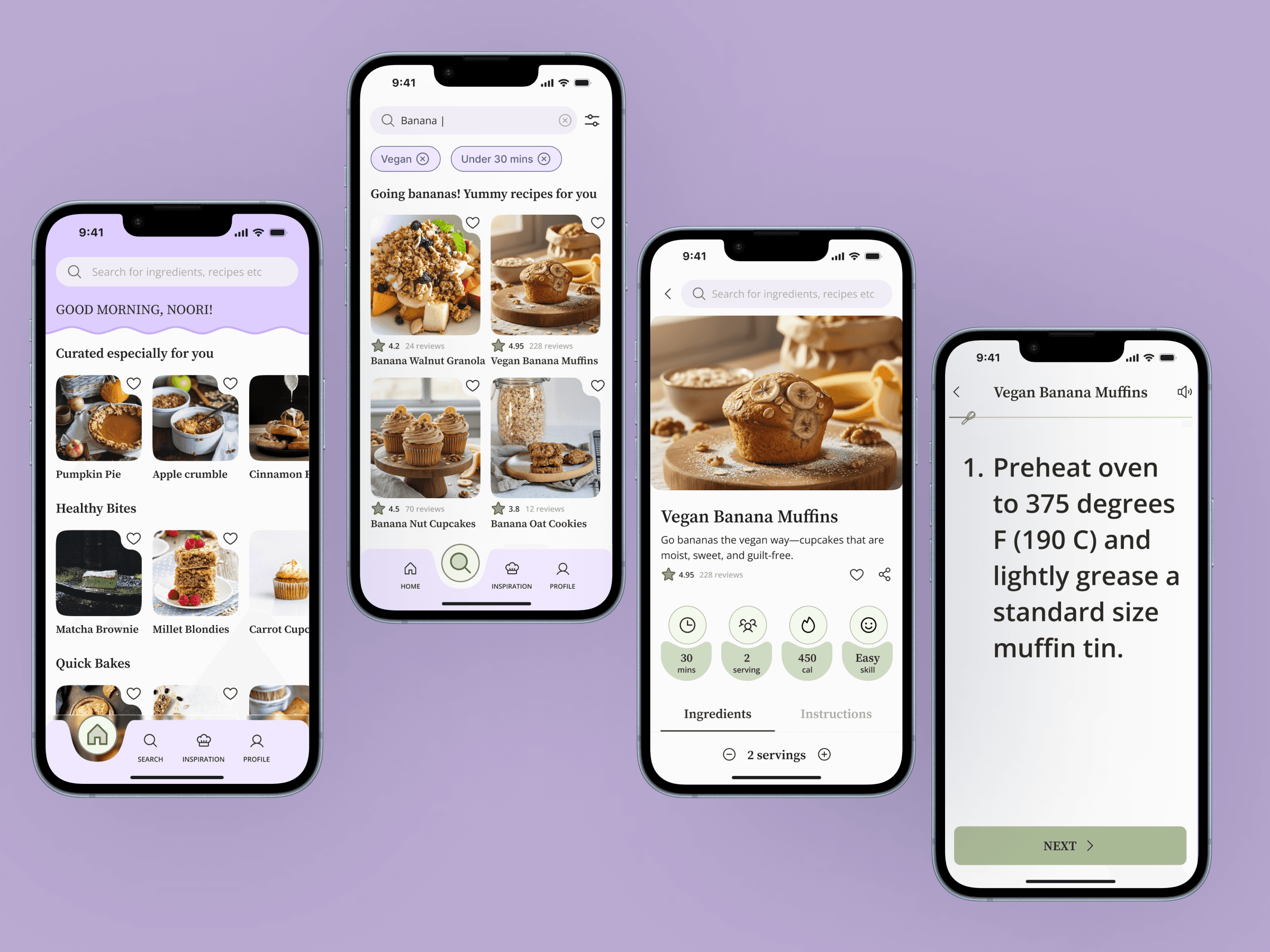
End To End Mobile Application
Client Project for TiriVelo
BakeFit - Making Healthy Baking Feel Like a Warm Hug, Not a Math Problem
Designing an Accessible Goal-based Baking Experience for Every Baker
Project Overview
Picture this- I'm elbow-deep in flour, phone propped against a mixing bowl, trying to read a recipe while my screen keeps locking. As someone with a background in baking and pastry, I'd been there too many times. But now that I was studying design, I wondered - What if there was an app designed for the actual chaos of baking?
That thought led me down a rabbit hole. The healthy baking market is exploding - projected to reach $23.6 billion by 2032 - yet every app I tested felt like it was designed for a pristine, hands-free kitchen that doesn't exist in real life.
Team
Sole UX/UI
Designer
Skills
Research
End to End Design
User Testing
Prototyping
Research
End to End Design
User Testing
Prototyping
Timeframe
8 week sprint
Tools Used
Figma
FigJam
ChatGPT
Otter.ai
Google Products
The Problem
Home bakers pursuing health goals were drowning in fragmented recipe sources, anxious about ingredient substitutions, and wrestling with phones mid-bake. The $23.6B healthy baking market had zero apps designed for the actual messy reality of a real kitchen.
The Solution
A goal-based mobile baking app with smart recipe organization, confident ingredient swapping guidance and an accessible "BakeMode", that works even when your hands are covered in flour.
THE IMPACT
From Kitchen Chaos to Confidence
The design led to a dramatically smoother and more intuitive Pet Owner experience, validated through usability testing.
100% Success Rates
For all key task completion
100% Success Rates
For all key task completion
100% Success Rates
For all key task completion
100% Readability
Accessible hands-on readability
100% Readability
Accessible hands-on readability
100% Readability
Accessible hands-on readability
Scored 4.7/5 for Ease
Users found navigation very easy
Scored 4.7/5 for Ease
Users found navigation very easy
Scored 4.7/5 for Ease
Users found navigation very easy
Ready for storytime?
01 - Research
Research insights that shaped the product
01 - Research
Research insights that shaped the product
01 - Research
Research insights that shaped the product
Playing Detective: What's Everyone Else Missing?
Competitive Analysis
I audited 4 popular cooking apps - Tasty, Mealime, King Arthur Baking and Ekilu. I tested every feature, clicked every button and took notes like a food critic.
The gaps were glaring -
Healthy Baking Niche (most apps were generic with not a lot of options for health/ diet based filters)
Lack of Smart Substitution suggestions (what happens if I swap butter for applesauce?)
Lack of Healthy Baking Community (I wanted inspiration, not forced engagement)
Static Recipe Instructions (my hands are covered in dough, I can't scroll!)
Recipe In-Organization (how do I categorize and search for saved recipes?)
Playing Detective: What's Everyone Else Missing?
Competitive Analysis
I audited 4 popular cooking apps - Tasty, Mealime, King Arthur Baking and Ekilu. I tested every feature, clicked every button and took notes like a food critic.
The gaps were glaring -
Healthy Baking Niche (most apps were generic with not a lot of options for health/ diet based filters)
Lack of Smart Substitution suggestions (what happens if I swap butter for applesauce?)
Lack of Healthy Baking Community (I wanted inspiration, not forced engagement)
Static Recipe Instructions (my hands are covered in dough, I can't scroll!)
Recipe In-Organization (how do I categorize and search for saved recipes?)
Playing Detective: What's Everyone Else Missing?
Competitive Analysis
I audited 4 popular cooking apps - Tasty, Mealime, King Arthur Baking and Ekilu. I tested every feature, clicked every button and took notes like a food critic.
The gaps were glaring -
Healthy Baking Niche (most apps were generic with not a lot of options for health/ diet based filters)
Lack of Smart Substitution suggestions (what happens if I swap butter for applesauce?)
Lack of Healthy Baking Community (I wanted inspiration, not forced engagement)
Static Recipe Instructions (my hands are covered in dough, I can't scroll!)
Recipe In-Organization (how do I categorize and search for saved recipes?)

That's when I knew, there was space for something different. Something that understood that healthy baking isn't just about calories - it's about having an interface that feels good while navigating a chaotic kitchen.
That's when I knew, there was space for something different. Something that understood that healthy baking isn't just about calories - it's about having an interface that feels good while navigating a chaotic kitchen.
That's when I knew, there was space for something different. Something that understood that healthy baking isn't just about calories - it's about having an interface that feels good while navigating a chaotic kitchen.
The Real Question- Would Anyone Actually Use This?
User Interviews
Before designing a single screen, I needed to understand the why behind healthy baking. So I talked to some bakers - from nervous beginners to confident home bakers, parents managing kids' allergies to fitness enthusiasts tracking macros.
7 bakers.
Google Meet.
45-60 minute conversations.
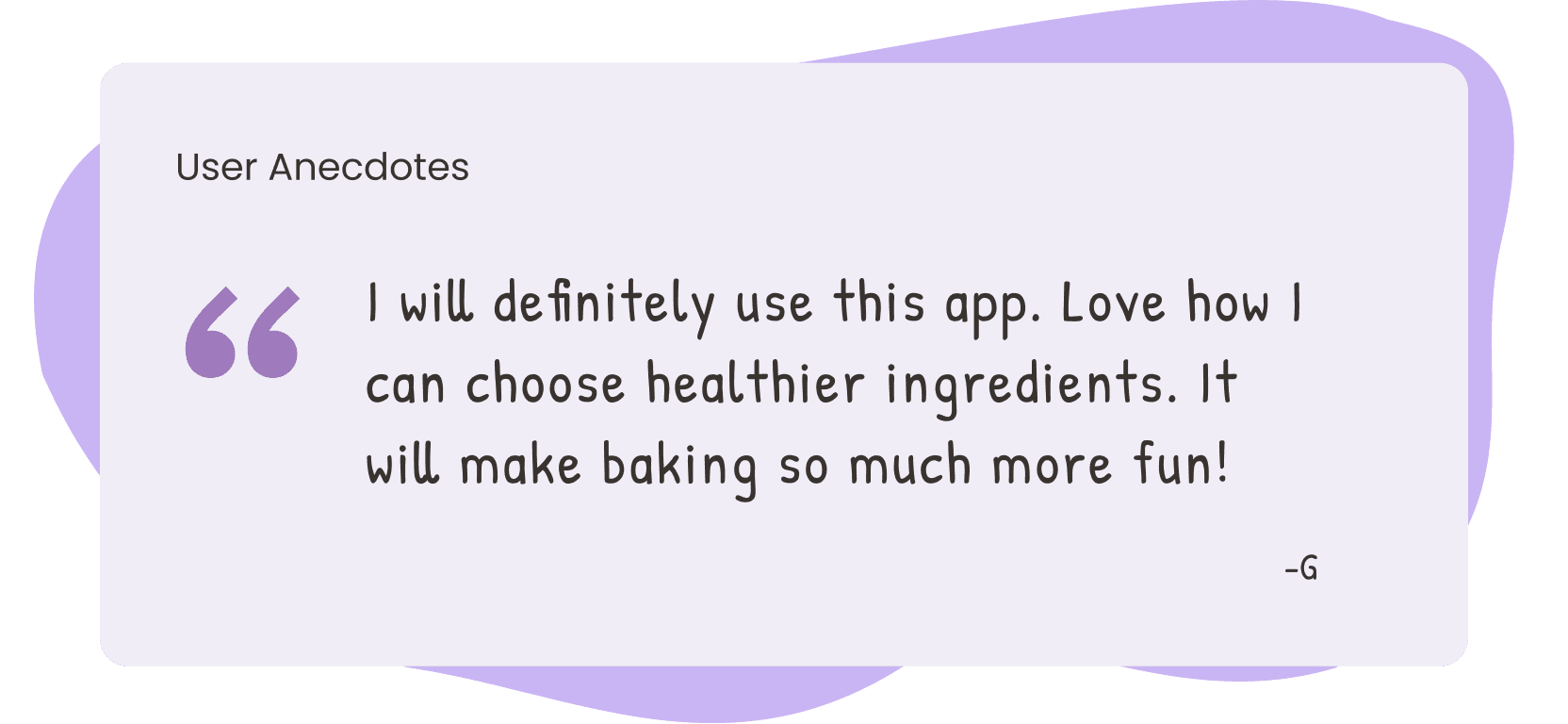
Here are some user anecdotes and pain points that kept showing up-
The Real Question- Would Anyone Actually Use This?
User Interviews
Before designing a single screen, I needed to understand the why behind healthy baking. So I talked to some bakers - from nervous beginners to confident home bakers, parents managing kids' allergies to fitness enthusiasts tracking macros.
7 bakers.
Google Meet.
45-60 minute conversations.
Here are some user anecdotes and pain points that kept showing up-
The Real Question- Would Anyone Actually Use This?
User Interviews
Before designing a single screen, I needed to understand the why behind healthy baking. So I talked to some bakers - from nervous beginners to confident home bakers, parents managing kids' allergies to fitness enthusiasts tracking macros.
7 bakers.
Google Meet.
45-60 minute conversations.
Here are some user anecdotes and pain points that kept showing up-
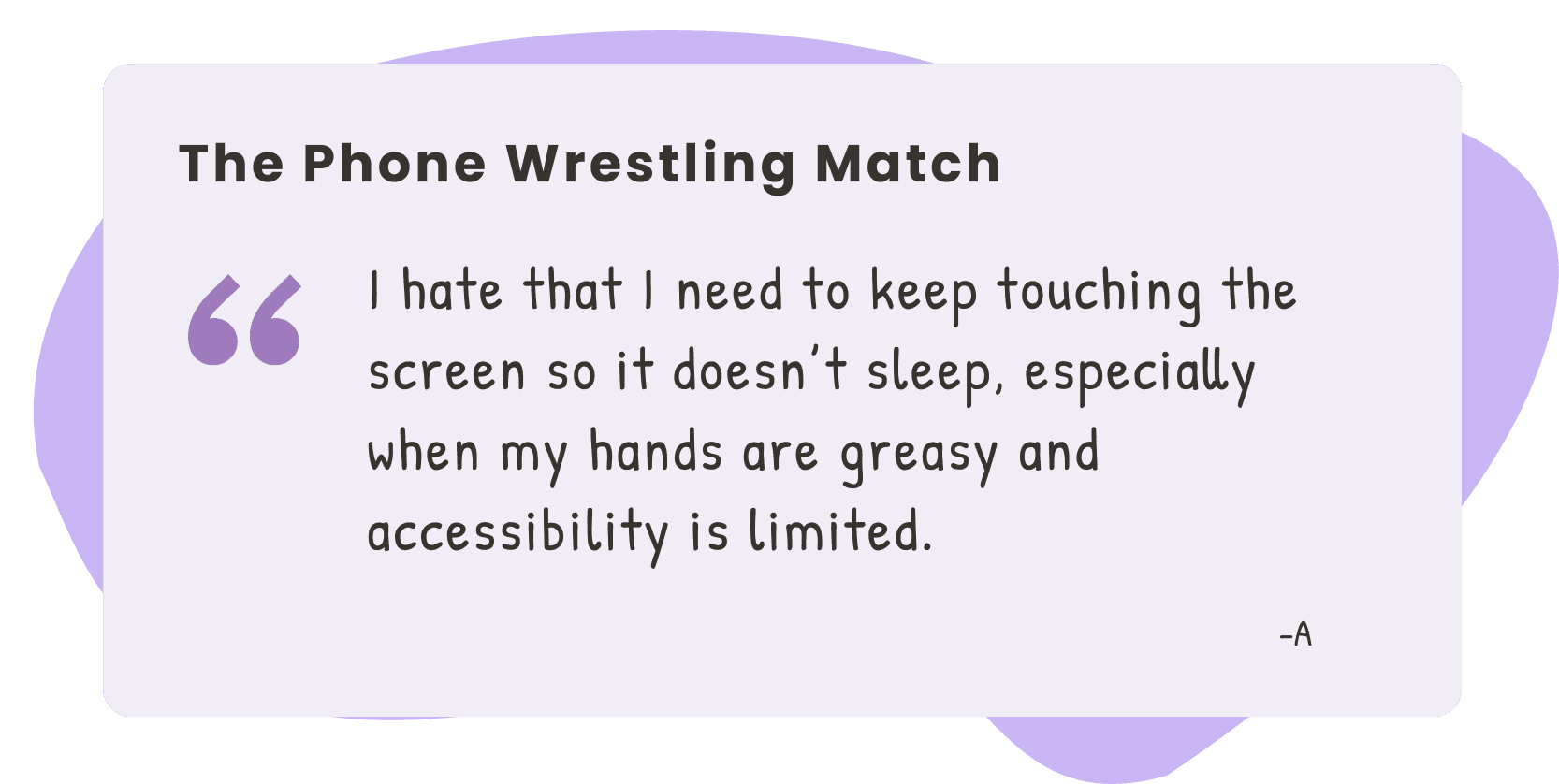
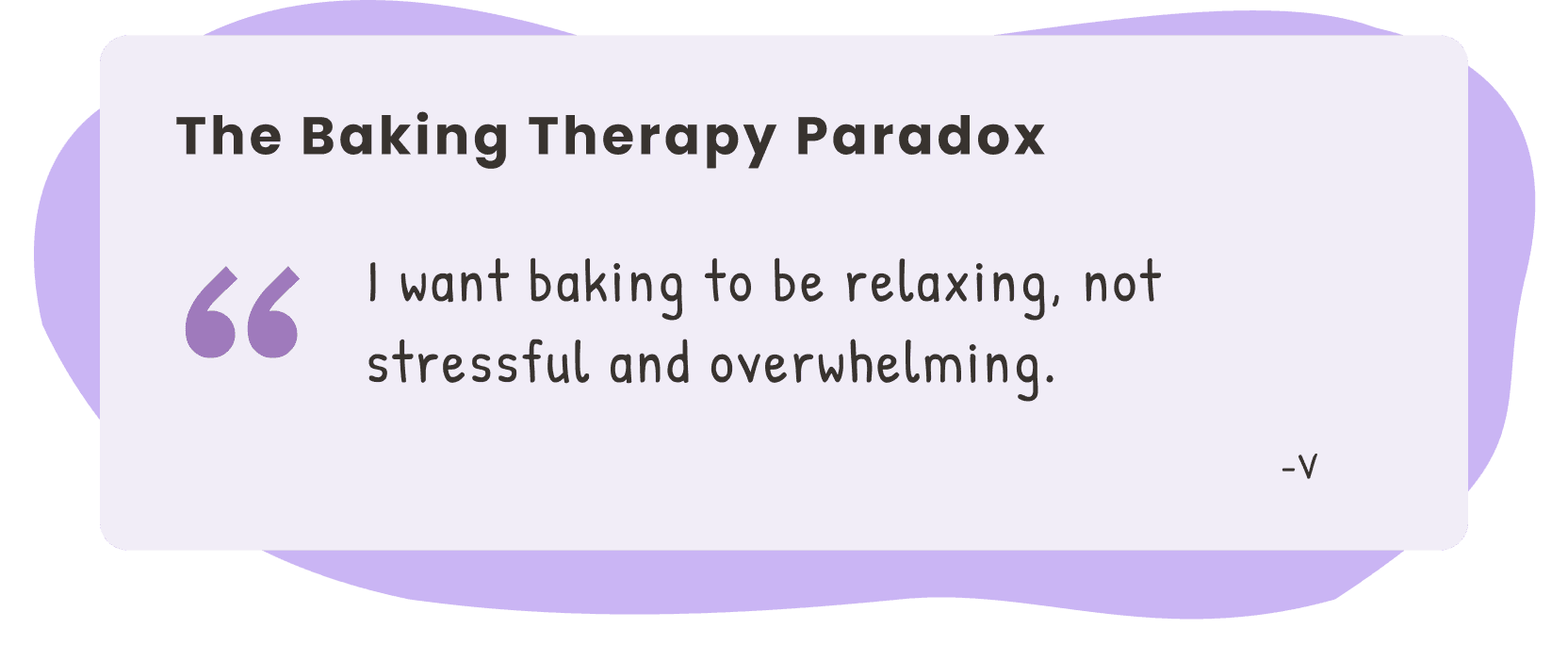
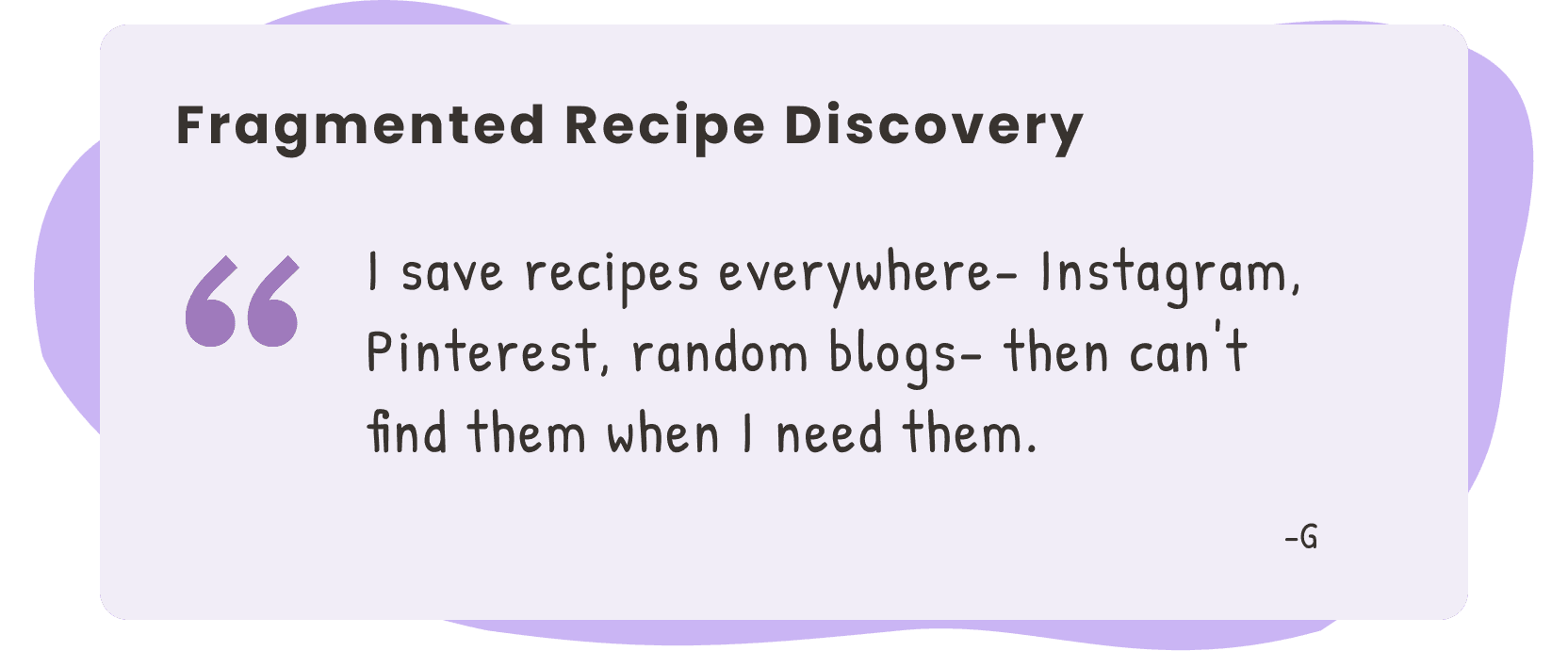
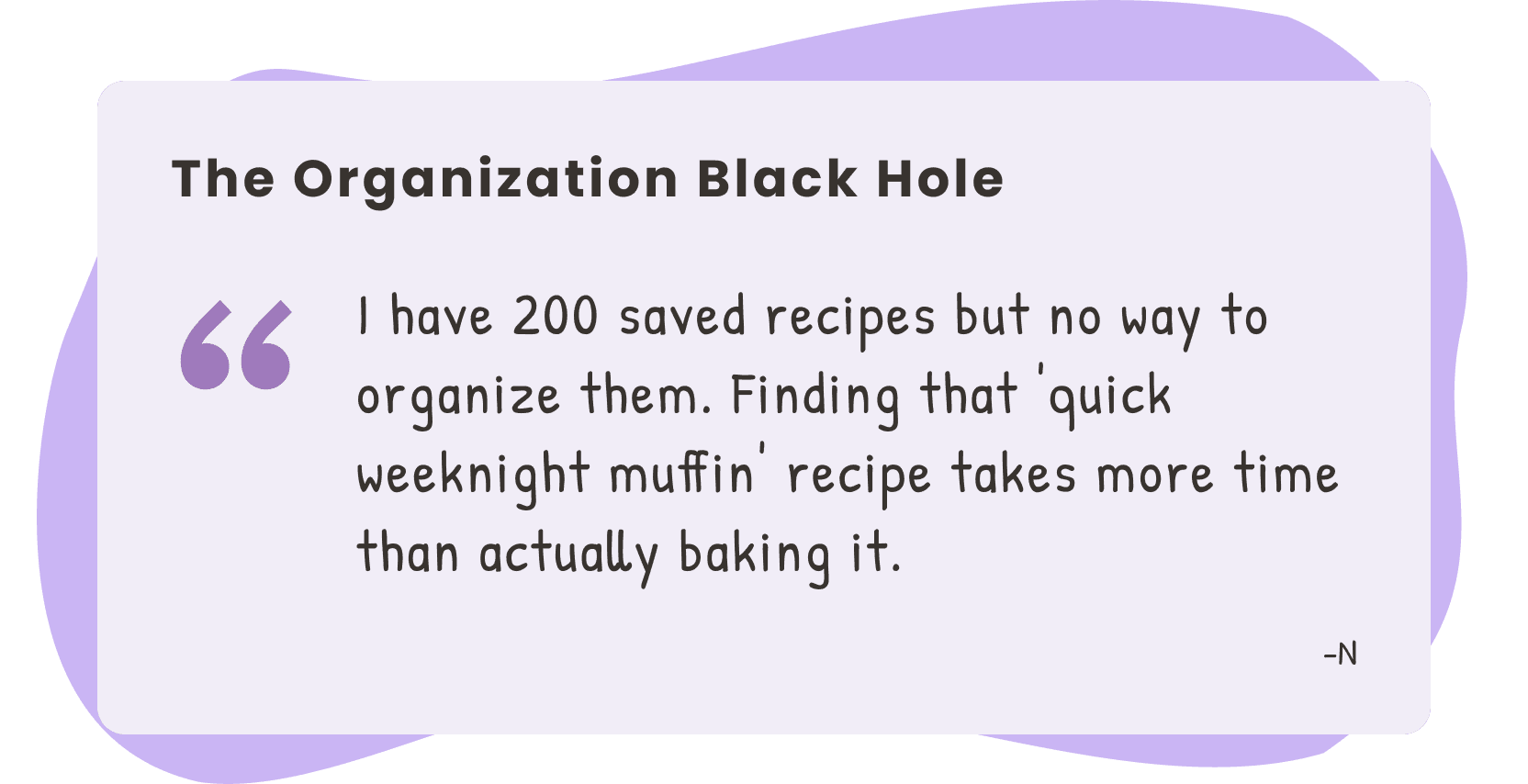
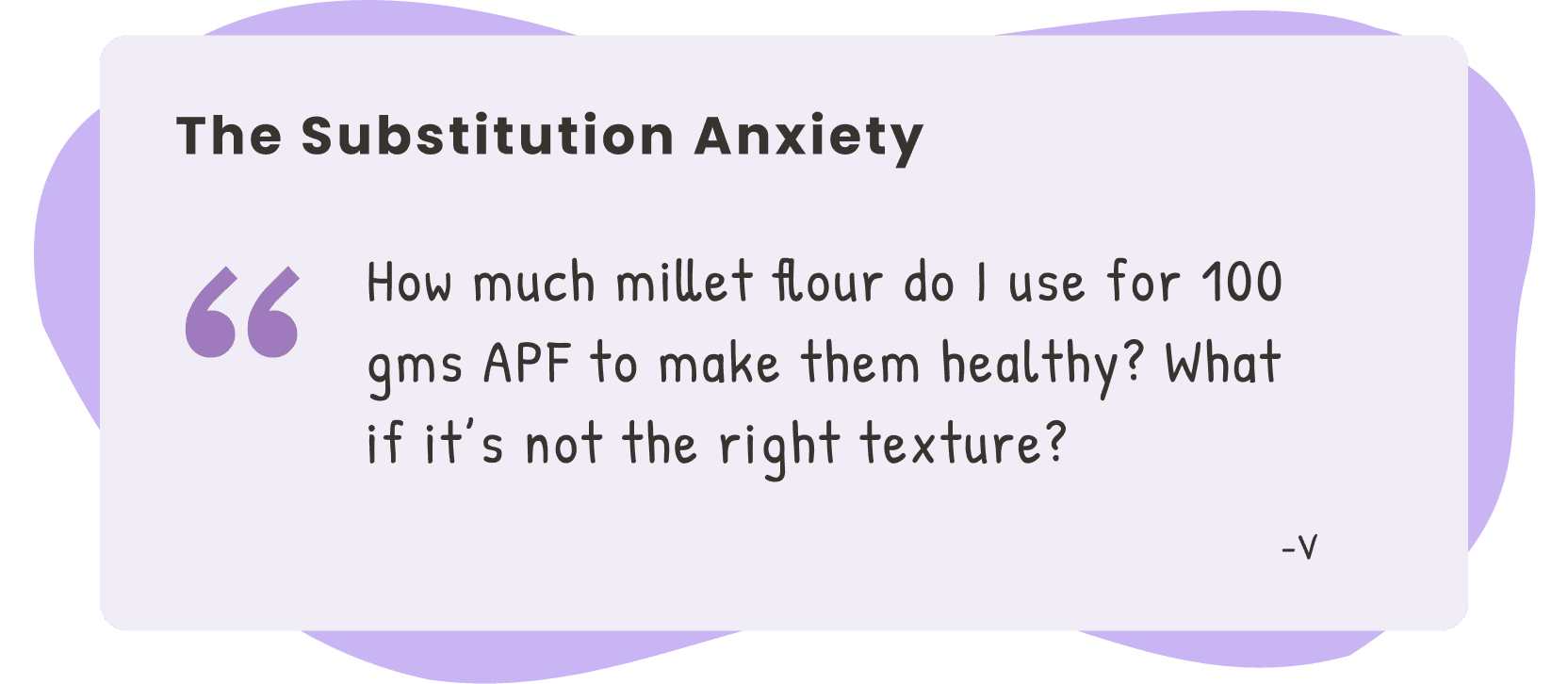
Every single person I interviewed mentioned phone frustration while baking. They wanted baking to feel relaxing, not stressful. 100% used phones, not tablets (there goes my tablet hypothesis!). And they all wanted the same thing - guidance without overwhelm.
Every single person I interviewed mentioned phone frustration while baking. They wanted baking to feel relaxing, not stressful. 100% used phones, not tablets (there goes my tablet hypothesis!). And they all wanted the same thing - guidance without overwhelm.
Every single person I interviewed mentioned phone frustration while baking. They wanted baking to feel relaxing, not stressful. 100% used phones, not tablets (there goes my tablet hypothesis!). And they all wanted the same thing - guidance without overwhelm.
02 - Research Analysis and Prioritization
Synthesizing empathy into actionable priorities
02 - Research Analysis and Prioritization
Synthesizing empathy into actionable priorities
02 - Research Analysis and Prioritization
Synthesizing empathy into actionable priorities
Unifying User Needs Into One Voice
User Persona
To ground our decisions in real user needs, I initially created 2 detailed personas. But since Bakefit’s brand values include inclusivity and accessibility for all, I combined them into 1.
Enter, Noori Gupta! The Social Health Hacker - someone who wants healthy results without sacrificing joy or community connection.
Unifying User Needs Into One Voice
User Persona
To ground our decisions in real user needs, I initially created 2 detailed personas. But since Bakefit’s brand values include inclusivity and accessibility for all, I combined them into 1.
Enter, Noori Gupta! The Social Health Hacker - someone who wants healthy results without sacrificing joy or community connection.
Unifying User Needs Into One Voice
User Persona
To ground our decisions in real user needs, I initially created 2 detailed personas. But since Bakefit’s brand values include inclusivity and accessibility for all, I combined them into 1.
Enter, Noori Gupta! The Social Health Hacker - someone who wants healthy results without sacrificing joy or community connection.
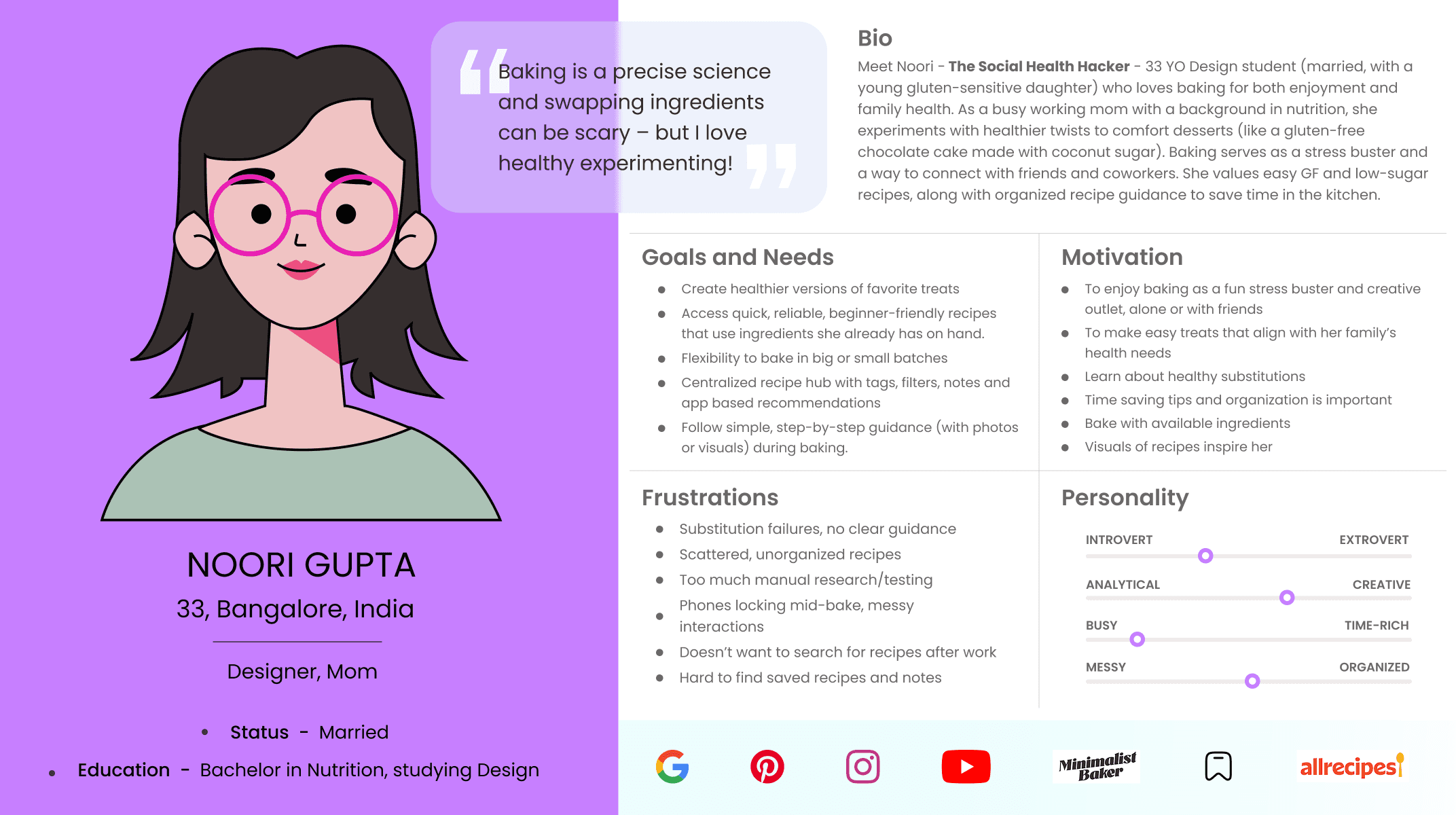
Primary Persona of Noori Gupta
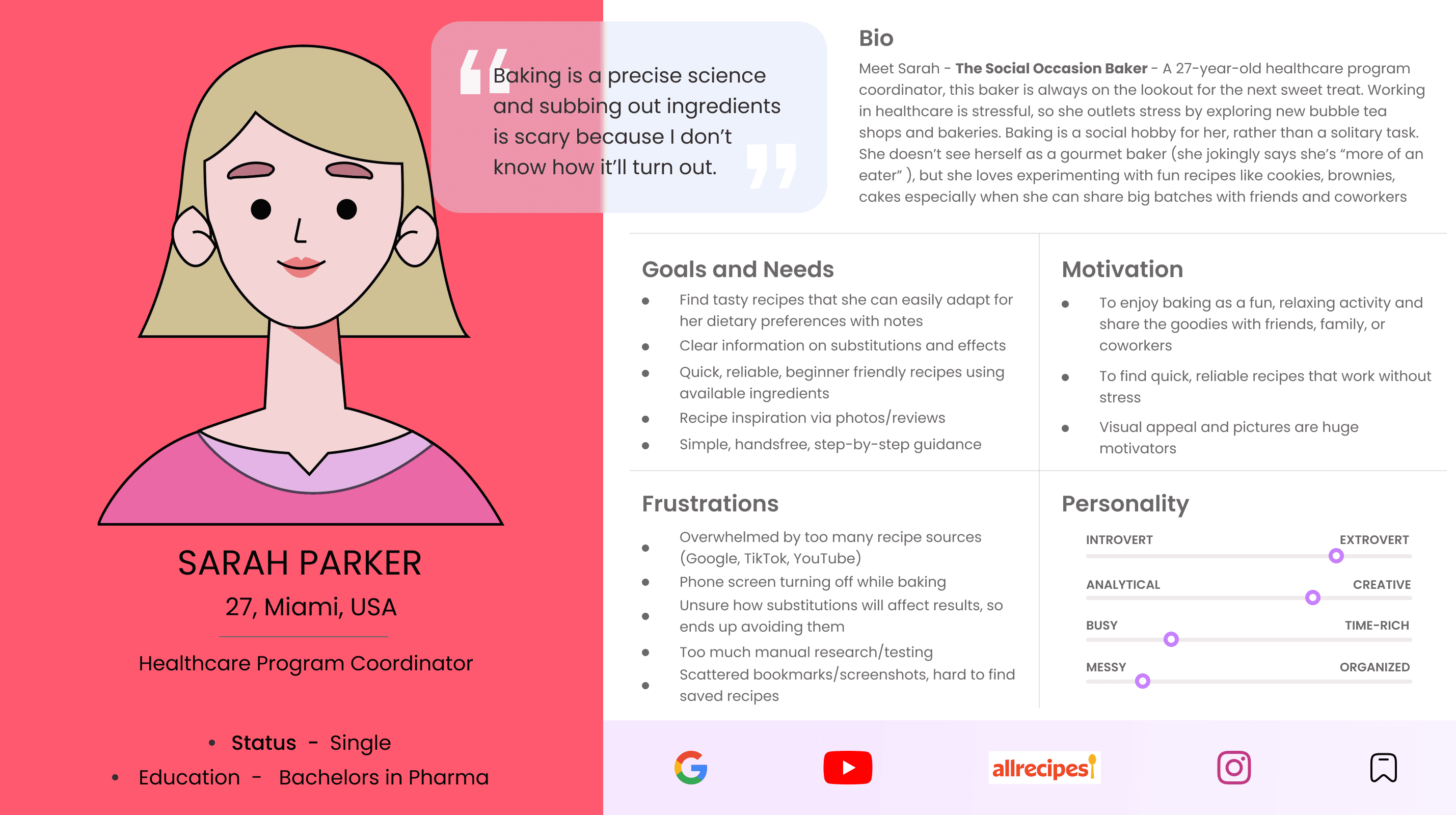
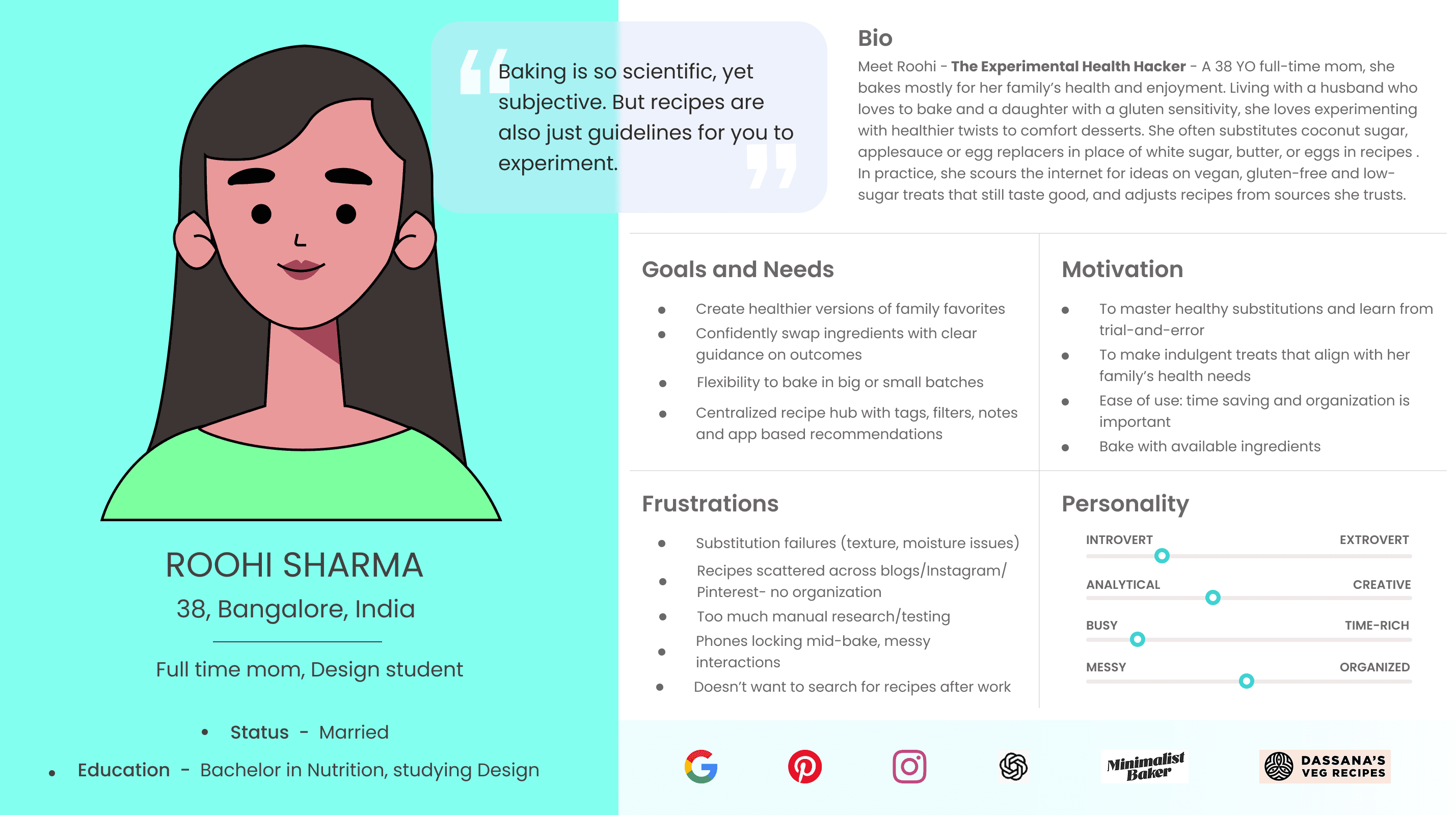
Click image to zoom into V1 personas
Getting Into Their Heads (and Hearts)
Empathy and Journey Maps
I'm a big believer that empathy isn't just a buzzword - it's the foundation of good design. So I created empathy maps and journey maps to walk through what a typical healthy baking session actually feels like.
When a baker's muffins come out fluffy and tall? They do a little happy dance! When they flop? They question their entire skill set.
The emotional stakes are real.
Getting Into Their Heads (and Hearts)
Empathy and Journey Maps
I'm a big believer that empathy isn't just a buzzword - it's the foundation of good design. So I created empathy maps and journey maps to walk through what a typical healthy baking session actually feels like.
When a baker's muffins come out fluffy and tall? They do a little happy dance! When they flop? They question their entire skill set.
The emotional stakes are real.
Getting Into Their Heads (and Hearts)
Empathy and Journey Maps
I'm a big believer that empathy isn't just a buzzword - it's the foundation of good design. So I created empathy maps and journey maps to walk through what a typical healthy baking session actually feels like.
When a baker's muffins come out fluffy and tall? They do a little happy dance! When they flop? They question their entire skill set.
The emotional stakes are real.
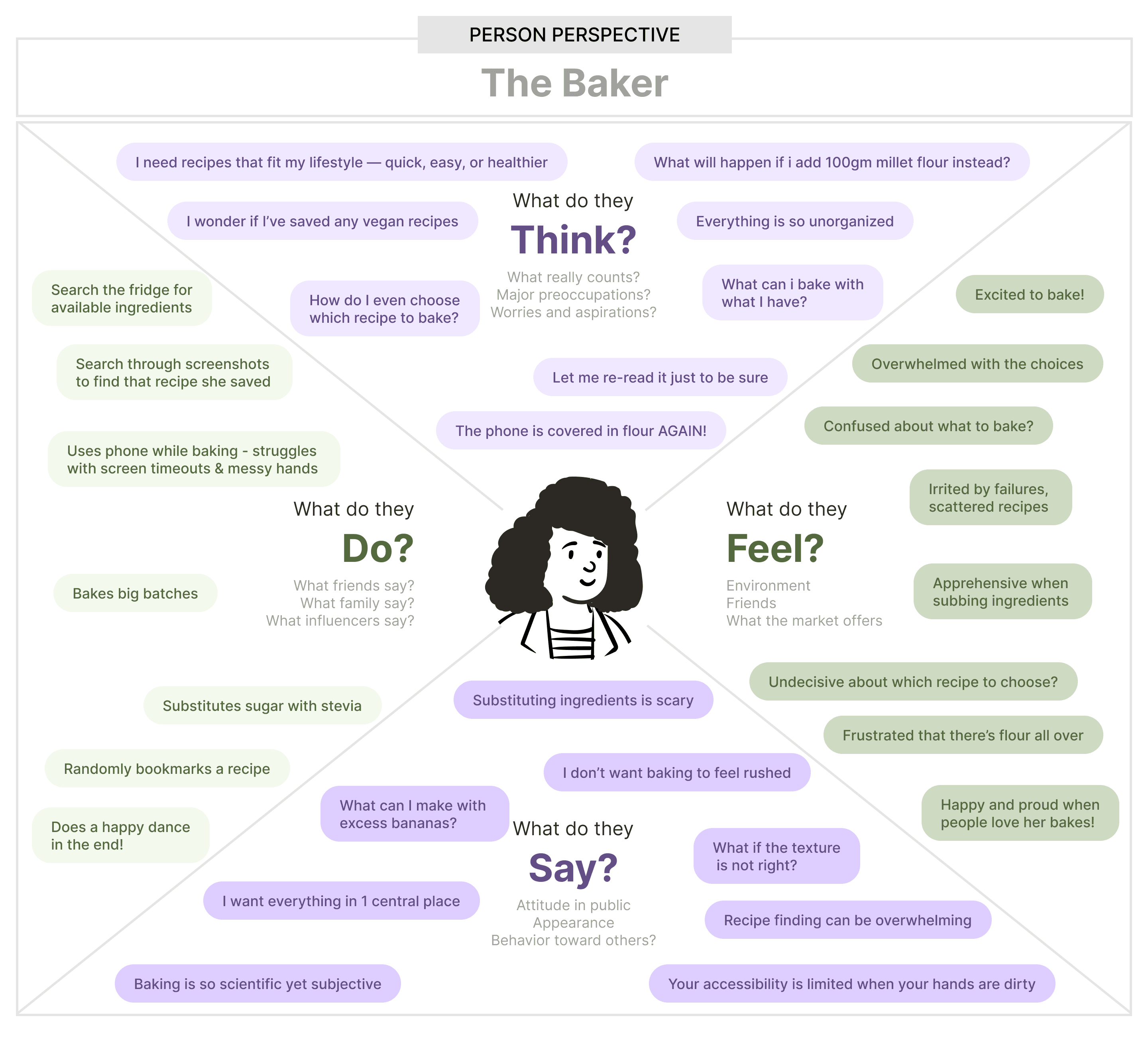
Empathy Map
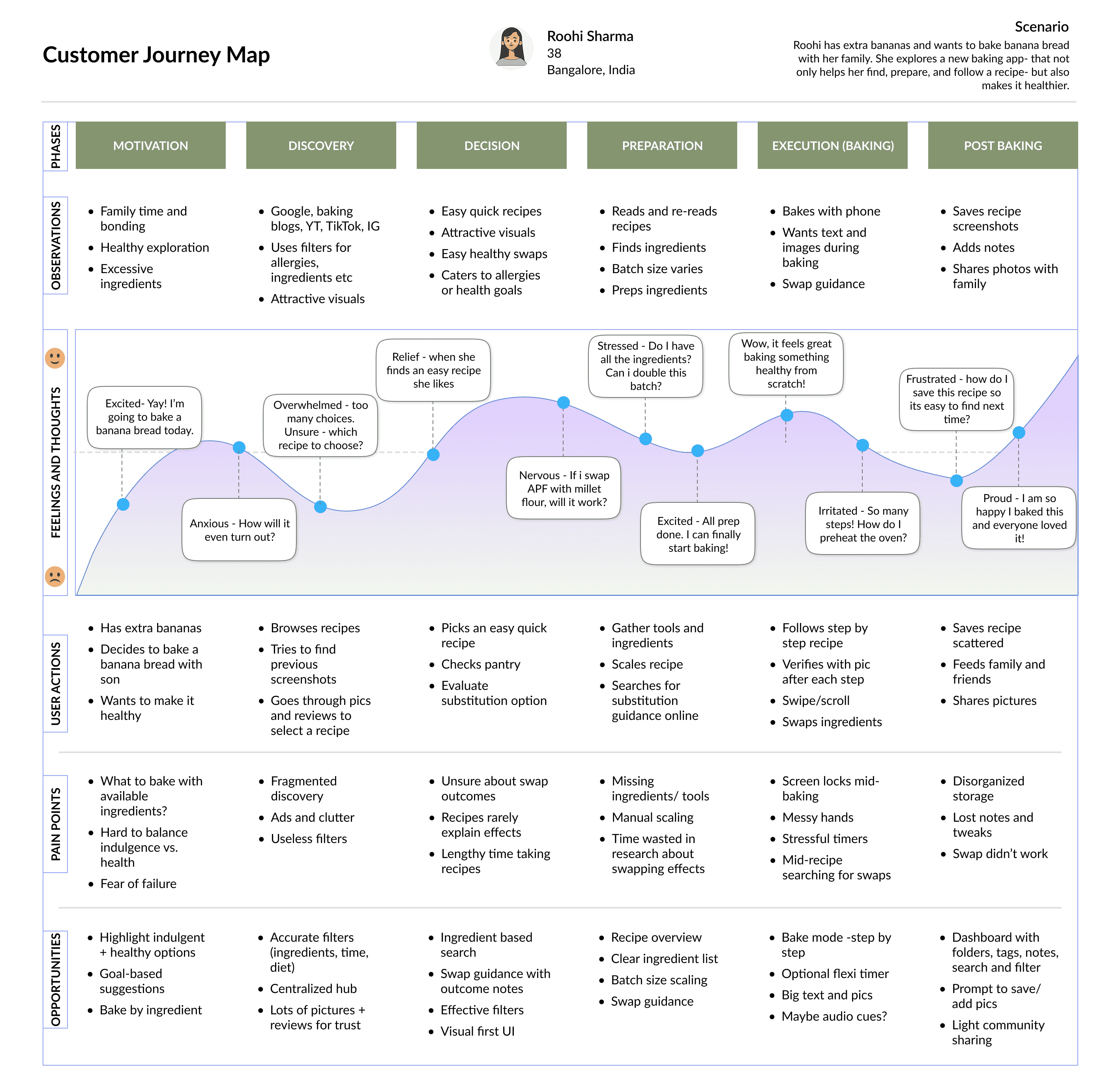
Journey Map
Click image to zoom in
The journey revealed something beautiful. Baking isn't just about the end product. It's about feeling calm, creative, and in control during the process.
The journey revealed something beautiful. Baking isn't just about the end product. It's about feeling calm, creative, and in control during the process.
The journey revealed something beautiful. Baking isn't just about the end product. It's about feeling calm, creative, and in control during the process.
Finding the Right Problem to Solve
How Might We Questions
With 7 users talking about dozens of problems, I needed to focus.
I used “Point of View” Statements to generate "How Might We" questions to narrow down to three core challenges -
Finding the Right Problem to Solve
How Might We Questions
With 7 users talking about dozens of problems, I needed to focus.
I used “Point of View” Statements to generate "How Might We" questions to narrow down to three core challenges -
Finding the Right Problem to Solve
How Might We Questions
With 7 users talking about dozens of problems, I needed to focus.
I used “Point of View” Statements to generate "How Might We" questions to narrow down to three core challenges -
How might we help bakers trust and experiment with healthier substitutions without fear of ruining their recipes, so baking feels enjoyable and stress-free?
How might we help bakers trust and experiment with healthier substitutions without fear of ruining their recipes, so baking feels enjoyable and stress-free?
How might we help bakers trust and experiment with healthier substitutions without fear of ruining their recipes, so baking feels enjoyable and stress-free?
How might we create a one-stop-shop for recipes that helps users quickly discover, save, and customize recipes according to their lifestyle goals and dietary needs?
How might we create a one-stop-shop for recipes that helps users quickly discover, save, and customize recipes according to their lifestyle goals and dietary needs?
How might we create a one-stop-shop for recipes that helps users quickly discover, save, and customize recipes according to their lifestyle goals and dietary needs?
How might we design a flexible system that guides users step by step, adapts to their pace and keeps their device accessible in the kitchen, so they can focus on the joy of baking?
How might we design a flexible system that guides users step by step, adapts to their pace and keeps their device accessible in the kitchen, so they can focus on the joy of baking?
How might we design a flexible system that guides users step by step, adapts to their pace and keeps their device accessible in the kitchen, so they can focus on the joy of baking?
Defining the MVP Under Constraints
Prioritization Matrix
I drew a prioritization matrix, factoring in my 100-hour constraint.
Some features, like AI conversational mode, were exciting but not essential for V1. Others, like a flexible BakeMode, were non-negotiable.
Defining the MVP Under Constraints
Prioritization Matrix
I drew a prioritization matrix, factoring in my 100-hour constraint.
Some features, like AI conversational mode, were exciting but not essential for V1. Others, like a flexible BakeMode, were non-negotiable.
Defining the MVP Under Constraints
Prioritization Matrix
I drew a prioritization matrix, factoring in my 100-hour constraint.
Some features, like AI conversational mode, were exciting but not essential for V1. Others, like a flexible BakeMode, were non-negotiable.
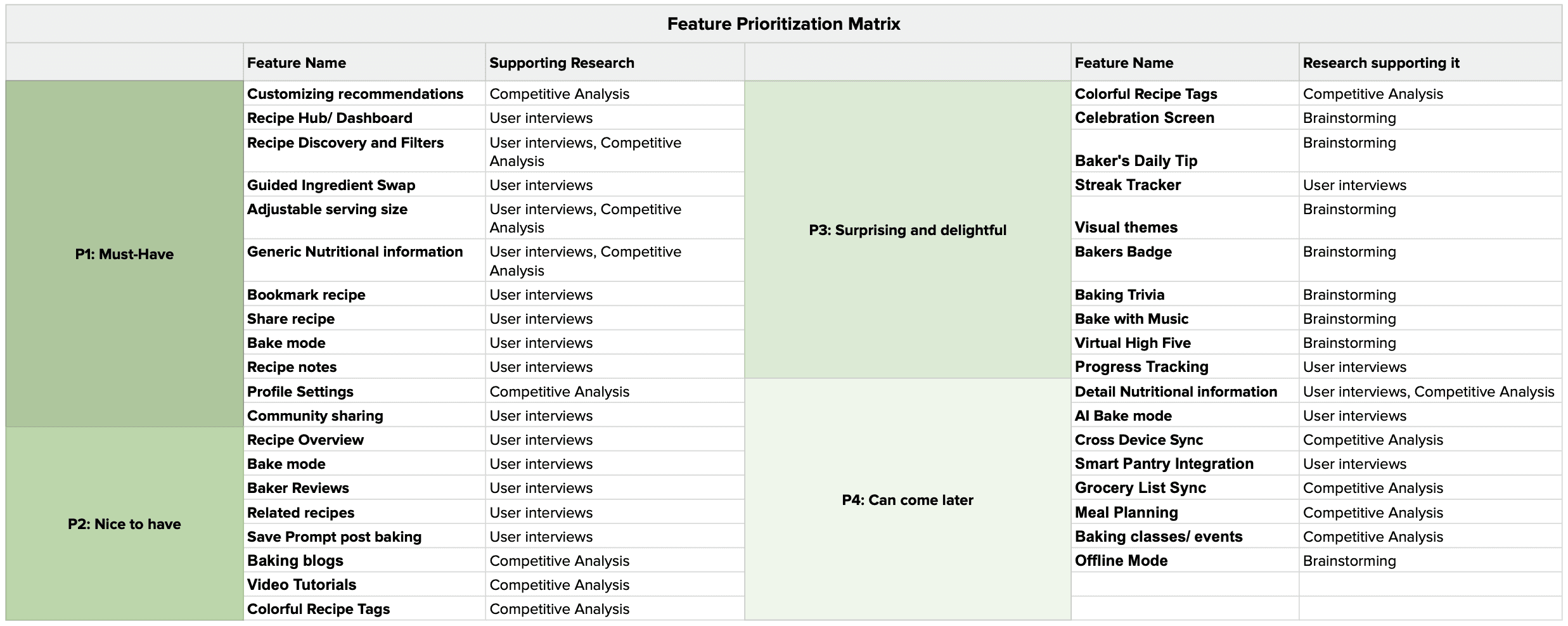
Click image to zoom in
The MVP emerged: A goal-based baking app with smart organization, substitution guidance and an accessible "BakeMode" that works even when your hands are covered in batter.
The MVP emerged: A goal-based baking app with smart organization, substitution guidance and an accessible "BakeMode" that works even when your hands are covered in batter.
The MVP emerged: A goal-based baking app with smart organization, substitution guidance and an accessible "BakeMode" that works even when your hands are covered in batter.
03 - Designs and Testing [Round 1]
Where Planning Met Play
03 - Designs and Testing [Round 1]
Where Planning Met Play
03 - Designs and Testing [Round 1]
Where Planning Met Play
Walking in Noori's Shoes
Information Architecture
I made a clear Sitemap and mapped Noori's entire journey - from opening the app hungry for inspiration, to saving a recipe, swapping an ingredient, and finally baking with BakeMode guiding her step-by-step.
V1 had happy paths, whereas V2 had alternate paths and error states to account for all possible roadblocks.
Walking in Noori's Shoes
Information Architecture
I made a clear Sitemap and mapped Noori's entire journey - from opening the app hungry for inspiration, to saving a recipe, swapping an ingredient, and finally baking with BakeMode guiding her step-by-step.
V1 had happy paths, whereas V2 had alternate paths and error states to account for all possible roadblocks.
Walking in Noori's Shoes
Information Architecture
I made a clear Sitemap and mapped Noori's entire journey - from opening the app hungry for inspiration, to saving a recipe, swapping an ingredient, and finally baking with BakeMode guiding her step-by-step.
V1 had happy paths, whereas V2 had alternate paths and error states to account for all possible roadblocks.
Sketching in the Messy Middle
Lo-Fi Screens
Now here's where I got my hands dirty.
I used Figma's AI Design Co-Pilot for rapid brainstorming - not to replace my thinking, but to accelerate exploration. I took inspiration from them and sketched some low fidelity screens on my tablet within hours.
I planned A/B tests for screen layouts I was uncertain about. Should the recipe categories be bento boxes or neatly laid out cards? Should the recipe cards be smaller (for less scrolling) or bigger (to emphasize pictures)? I sketched both options, knowing users would tell me what worked.
Then I built mid-fidelity prototypes in grayscale - no fancy colors, just layouts, hierarchy and functionality.
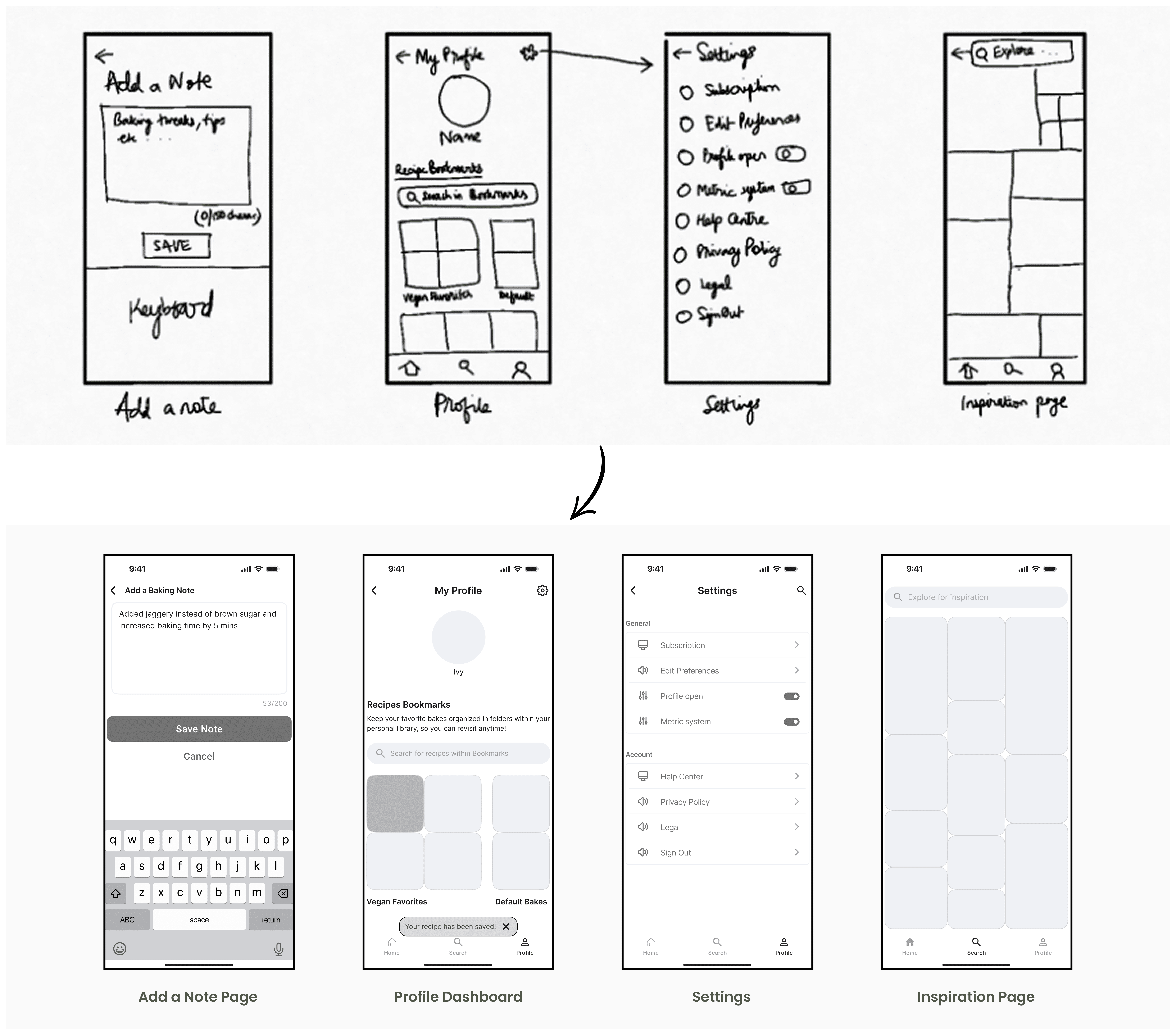
Here are some low-fidelity sketches converted into mid-fidelity wireframes:
Sketching in the Messy Middle
Lo-Fi Screens
Now here's where I got my hands dirty.
I used Figma's AI Design Co-Pilot for rapid brainstorming - not to replace my thinking, but to accelerate exploration. I took inspiration from them and sketched some low fidelity screens on my tablet within hours.
I planned A/B tests for screen layouts I was uncertain about. Should the recipe categories be bento boxes or neatly laid out cards? Should the recipe cards be smaller (for less scrolling) or bigger (to emphasize pictures)? I sketched both options, knowing users would tell me what worked.
Then I built mid-fidelity prototypes in grayscale - no fancy colors, just layouts, hierarchy and functionality.
Here are some low-fidelity sketches converted into mid-fidelity wireframes:
Sketching in the Messy Middle
Lo-Fi Screens
Now here's where I got my hands dirty.
I used Figma's AI Design Co-Pilot for rapid brainstorming - not to replace my thinking, but to accelerate exploration. I took inspiration from them and sketched some low fidelity screens on my tablet within hours.
I planned A/B tests for screen layouts I was uncertain about. Should the recipe categories be bento boxes or neatly laid out cards? Should the recipe cards be smaller (for less scrolling) or bigger (to emphasize pictures)? I sketched both options, knowing users would tell me what worked.
Then I built mid-fidelity prototypes in grayscale - no fancy colors, just layouts, hierarchy and functionality.
Here are some low-fidelity sketches converted into mid-fidelity wireframes:



Testing the Theory Early
User Testing 1.0
To validate my designs, I conducted Remote Moderated Usability Testing on Google Meet.
4 participants.
6 core flows.
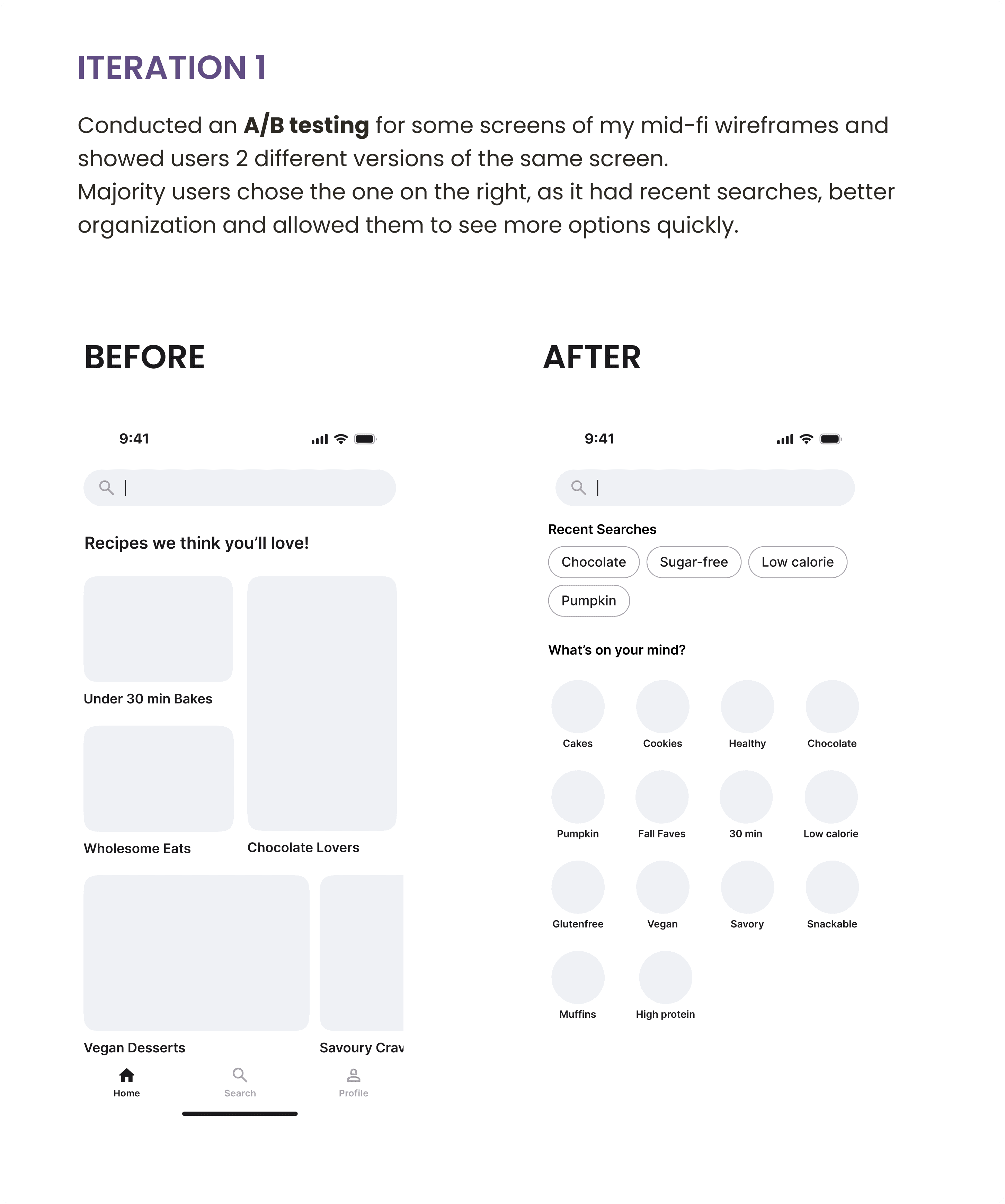
I also ran A/B tests with 11 participants for 4 different screens. Understandably, they preferred layouts that were scannable and visual - they wanted to see more options quickly without endless scrolling.
Testing the Theory Early
User Testing 1.0
To validate my designs, I conducted Remote Moderated Usability Testing on Google Meet.
4 participants.
6 core flows.
I also ran A/B tests with 11 participants for 4 different screens. Understandably, they preferred layouts that were scannable and visual - they wanted to see more options quickly without endless scrolling.
Testing the Theory Early
User Testing 1.0
To validate my designs, I conducted Remote Moderated Usability Testing on Google Meet.
4 participants.
6 core flows.
I also ran A/B tests with 11 participants for 4 different screens. Understandably, they preferred layouts that were scannable and visual - they wanted to see more options quickly without endless scrolling.
What Broke
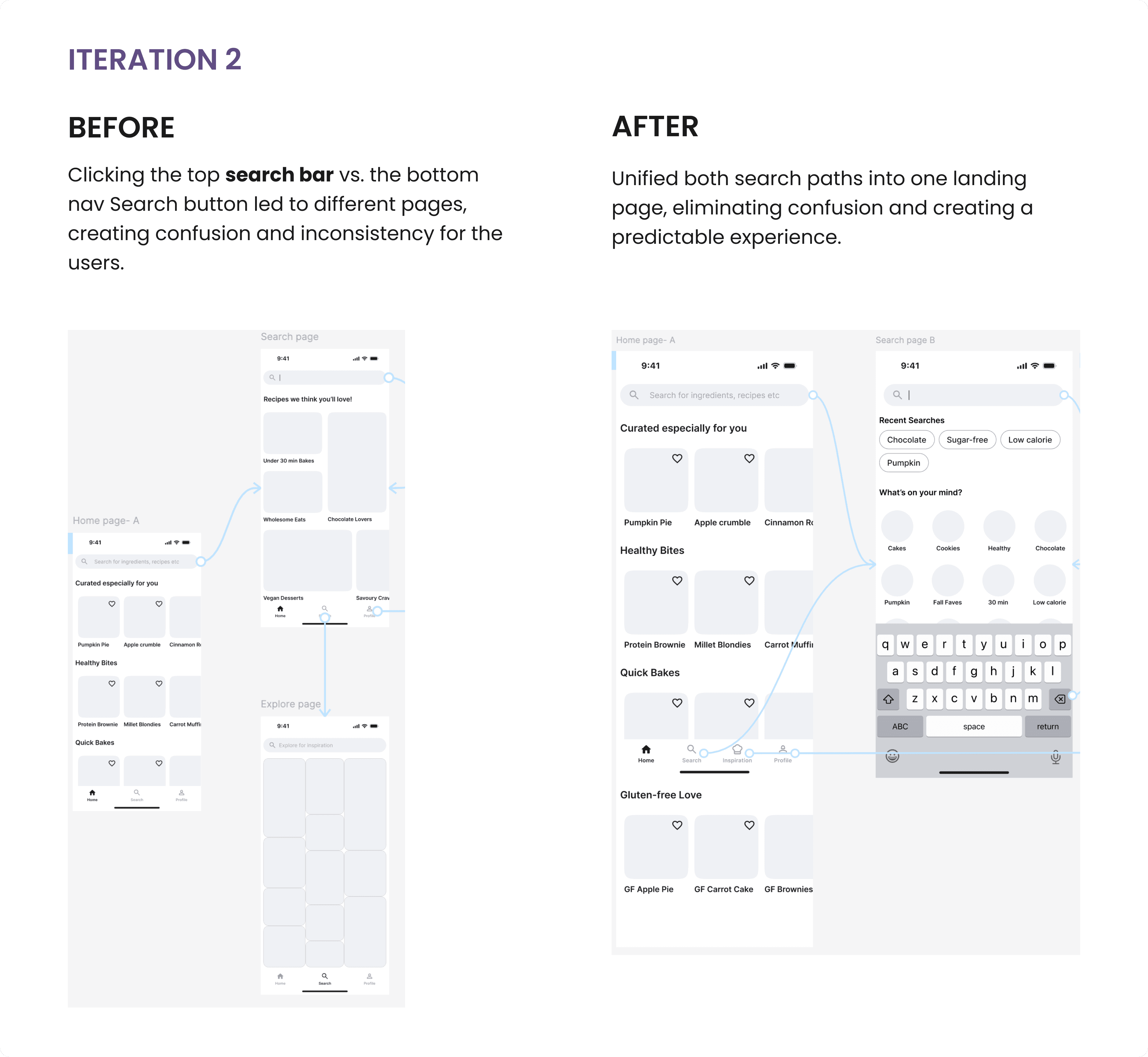
❌ The search bar wasn’t too noticeable to most users and there was confusion around it.
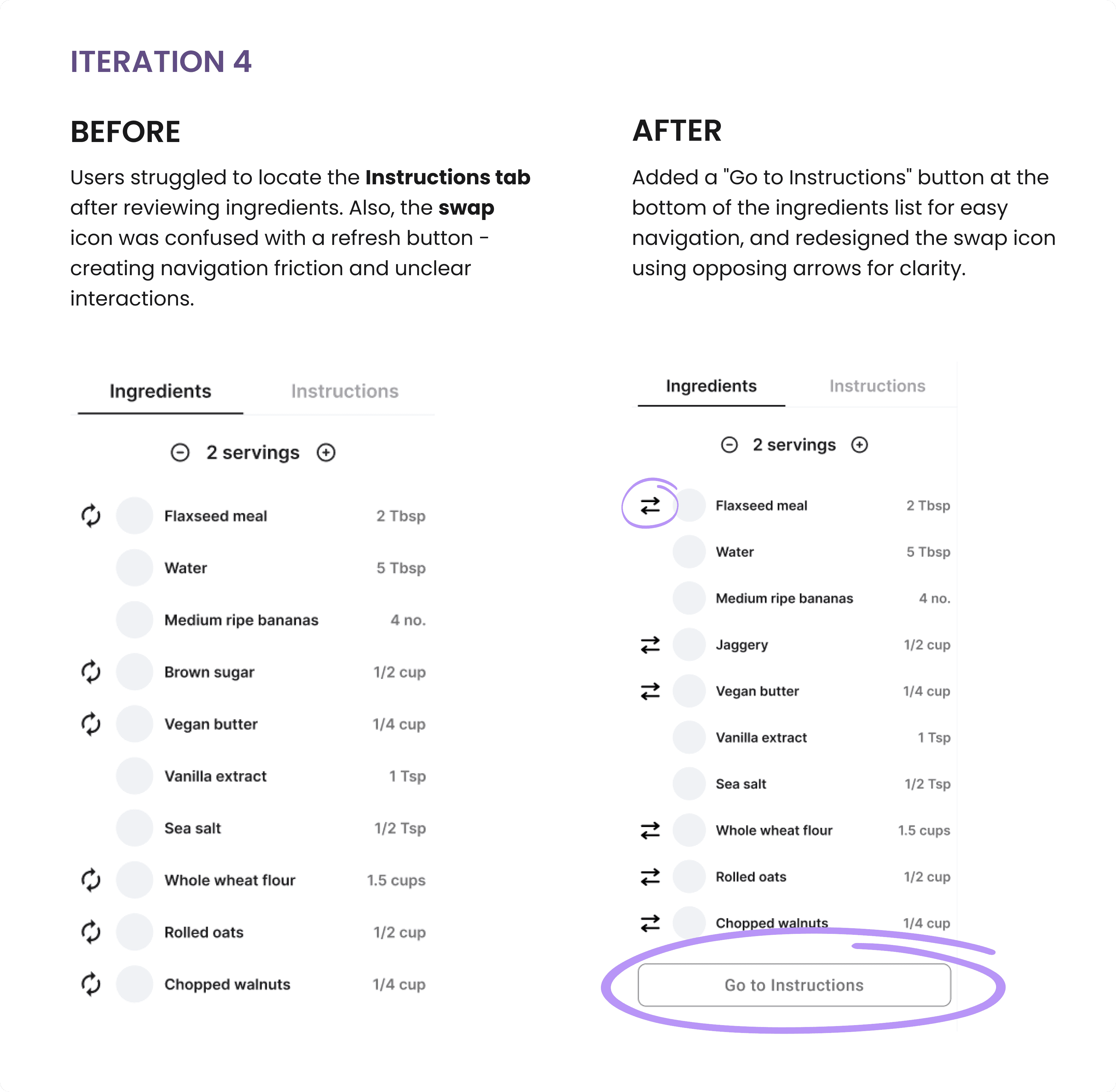
❌ The "swap" icon looked like a refresh button to 25% users
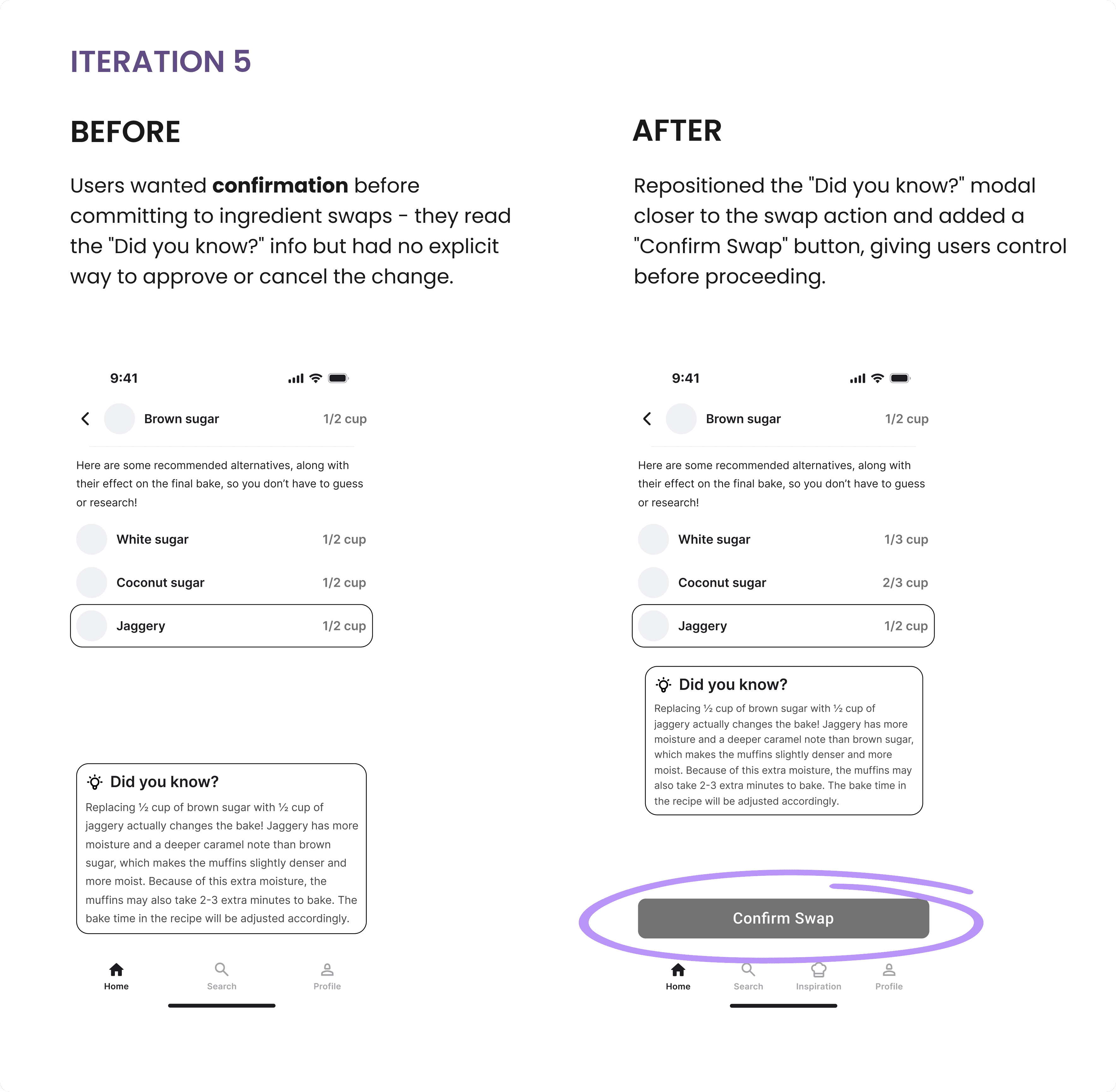
❌ 50% Users wanted a button to confirm swaps, not just auto-apply
❌ The "Instructions" tab got overlooked
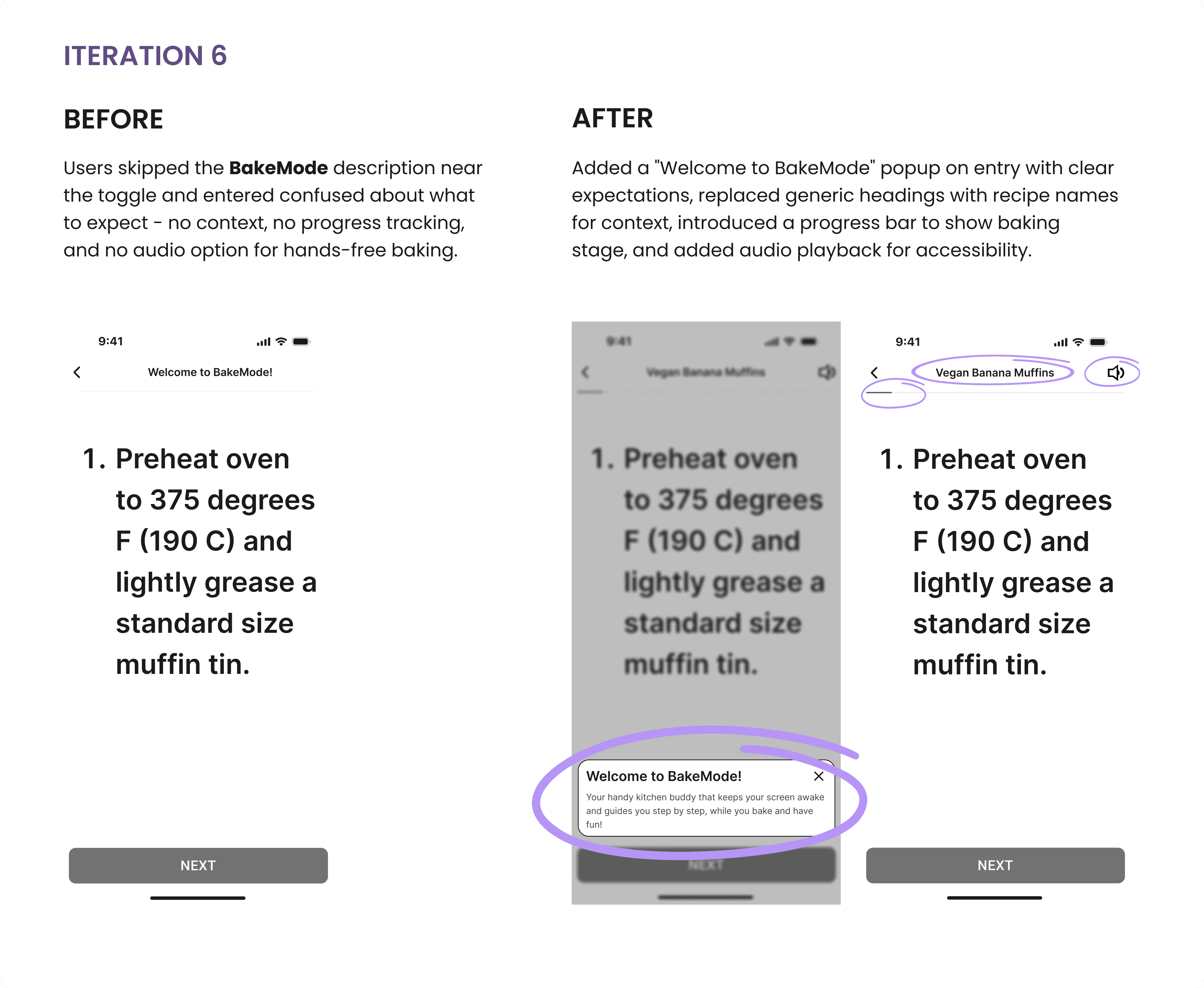
❌ BakeMode was confusing to 25% users
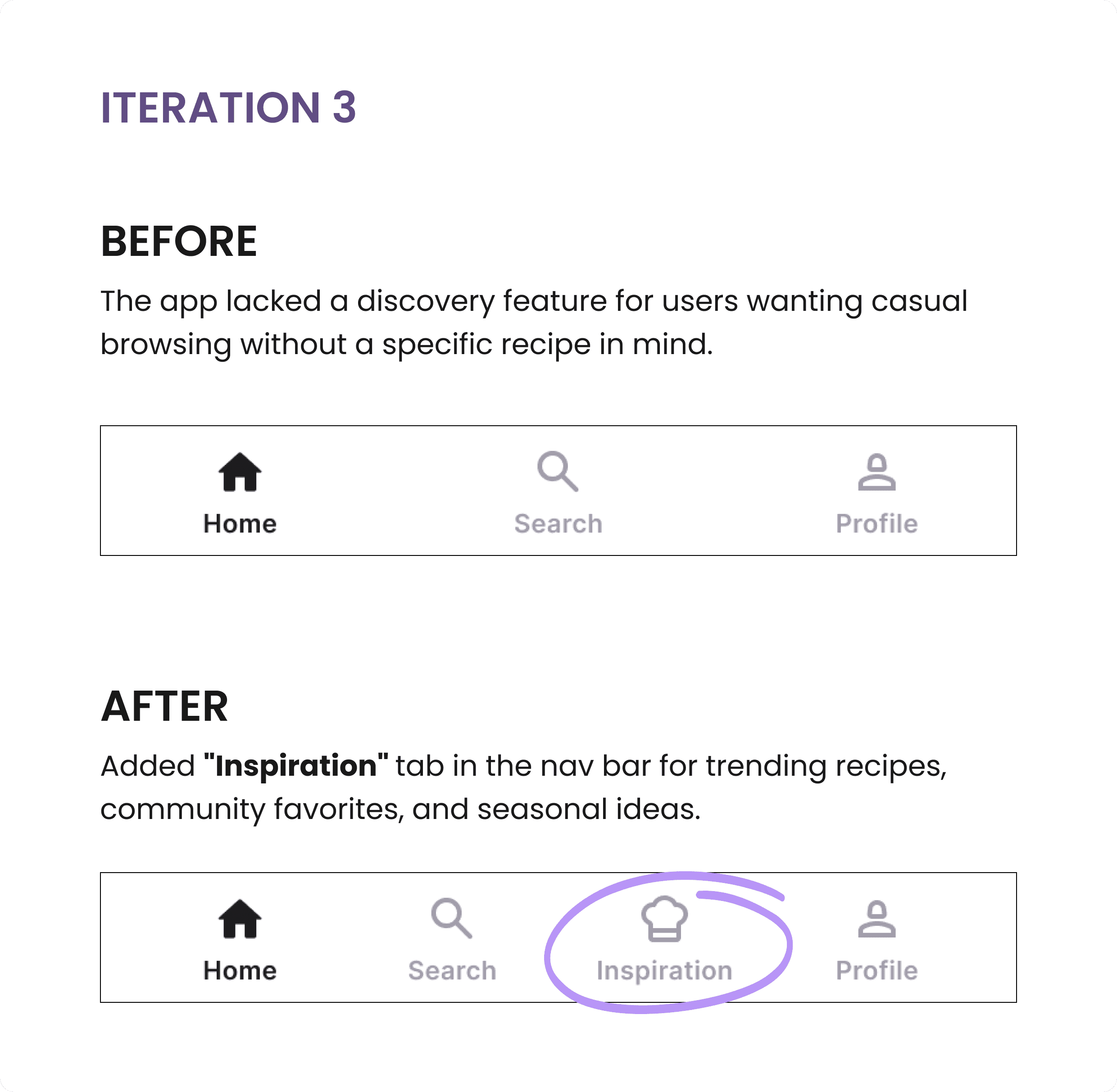
❌ Where would users go for mindless scrolling and inspiration?
What Worked
✅ 75% users loved the idea and accessibility of BakeMode. "It was so clutter-free!"
✅ Recipe organization by folders? "Finally!"
✅ ‘Did you know?’ for Ingredient substitution? "This is genius!". Users loved the detailed information and guidance it imparted.
✅ Users loved the filter categories and filter tags during recipe search
✅ Users loved the popups for visual feedback of saved recipes and saved notes.
✅ "Searching with bookmarked recipes? Wow!"
The Fixes
These findings didn't just validate problems - they gave me a clear roadmap for iteration.
I improved visibility, clarified interactions, added confirmations, enhanced discoverability, and refined navigation - addressing each friction point systematically.
Each change was intentional, addressing user friction while preserving the clean, accessible experience.
The Fixes
These findings didn't just validate problems - they gave me a clear roadmap for iteration.
I improved visibility, clarified interactions, added confirmations, enhanced discoverability, and refined navigation - addressing each friction point systematically.
Each change was intentional, addressing user friction while preserving the clean, accessible experience.
The Fixes
These findings didn't just validate problems - they gave me a clear roadmap for iteration.
I improved visibility, clarified interactions, added confirmations, enhanced discoverability, and refined navigation - addressing each friction point systematically.
Each change was intentional, addressing user friction while preserving the clean, accessible experience.
04 - User Interface and Branding
Curating Calming Visuals - Making It Feel Like Home
04 - User Interface and Branding
Curating Calming Visuals - Making It Feel Like Home
04 - User Interface and Branding
Curating Calming Visuals - Making It Feel Like Home
The Color Story
Color Palette
Now came the fun part: bringing warmth and personality to the design.
Please welcome, BakeFit!
I created a mood board inspired by the feeling of Sunday morning baking - calm, cozy, but with a spark of creativity. I wanted colors that represented the brand values of BakeFit - Healthy, Inclusivity, Creativity, Wholesome, Balance, Reliability.
The Color Story -
Sage green: Wholesome, healthy, natural
Soft lavender: Calming vibes in a chaotic kitchen
Warm oatmeal neutrals: Comfort and warmth
I tested contrast ratios using Stark to keep accessibility at the forefront.
The Color Story
Color Palette
Now came the fun part: bringing warmth and personality to the design.
Please welcome, BakeFit!
I created a mood board inspired by the feeling of Sunday morning baking - calm, cozy, but with a spark of creativity. I wanted colors that represented the brand values of BakeFit - Healthy, Inclusivity, Creativity, Wholesome, Balance, Reliability.
The Color Story -
Sage green: Wholesome, healthy, natural
Soft lavender: Calming vibes in a chaotic kitchen
Warm oatmeal neutrals: Comfort and warmth
I tested contrast ratios using Stark to keep accessibility at the forefront.
The Color Story
Color Palette
Now came the fun part: bringing warmth and personality to the design.
Please welcome, BakeFit!
I created a mood board inspired by the feeling of Sunday morning baking - calm, cozy, but with a spark of creativity. I wanted colors that represented the brand values of BakeFit - Healthy, Inclusivity, Creativity, Wholesome, Balance, Reliability.
The Color Story -
Sage green: Wholesome, healthy, natural
Soft lavender: Calming vibes in a chaotic kitchen
Warm oatmeal neutrals: Comfort and warmth
I tested contrast ratios using Stark to keep accessibility at the forefront.
Fonts You Can Read While Covered in Flour
Typography
After spending way too much time on font hunting, I chose the following -
Source Serif 4 for headings: Elegant, premium, trustworthy
Open Sans for body: Clean, legible even when squinting at a phone from across the counter
Fonts You Can Read While Covered in Flour
Typography
After spending way too much time on font hunting, I chose the following -
Source Serif 4 for headings: Elegant, premium, trustworthy
Open Sans for body: Clean, legible even when squinting at a phone from across the counter
Fonts You Can Read While Covered in Flour
Typography
After spending way too much time on font hunting, I chose the following -
Source Serif 4 for headings: Elegant, premium, trustworthy
Open Sans for body: Clean, legible even when squinting at a phone from across the counter
A/B Testing Our Way to the Perfect Logo
Brand Logo
For the logo, I sketched and explored a lot of ideas.
I finally incorporated a whisk (the ultimate baking icon) with the Borel font - handwritten, warm, and playful. I A/B tested two logo versions with 10 users, and the handwritten style won for feeling more "homemade."
A/B Testing Our Way to the Perfect Logo
Brand Logo
For the logo, I sketched and explored a lot of ideas.
I finally incorporated a whisk (the ultimate baking icon) with the Borel font - handwritten, warm, and playful. I A/B tested two logo versions with 10 users, and the handwritten style won for feeling more "homemade."
A/B Testing Our Way to the Perfect Logo
Brand Logo
For the logo, I sketched and explored a lot of ideas.
I finally incorporated a whisk (the ultimate baking icon) with the Borel font - handwritten, warm, and playful. I A/B tested two logo versions with 10 users, and the handwritten style won for feeling more "homemade."
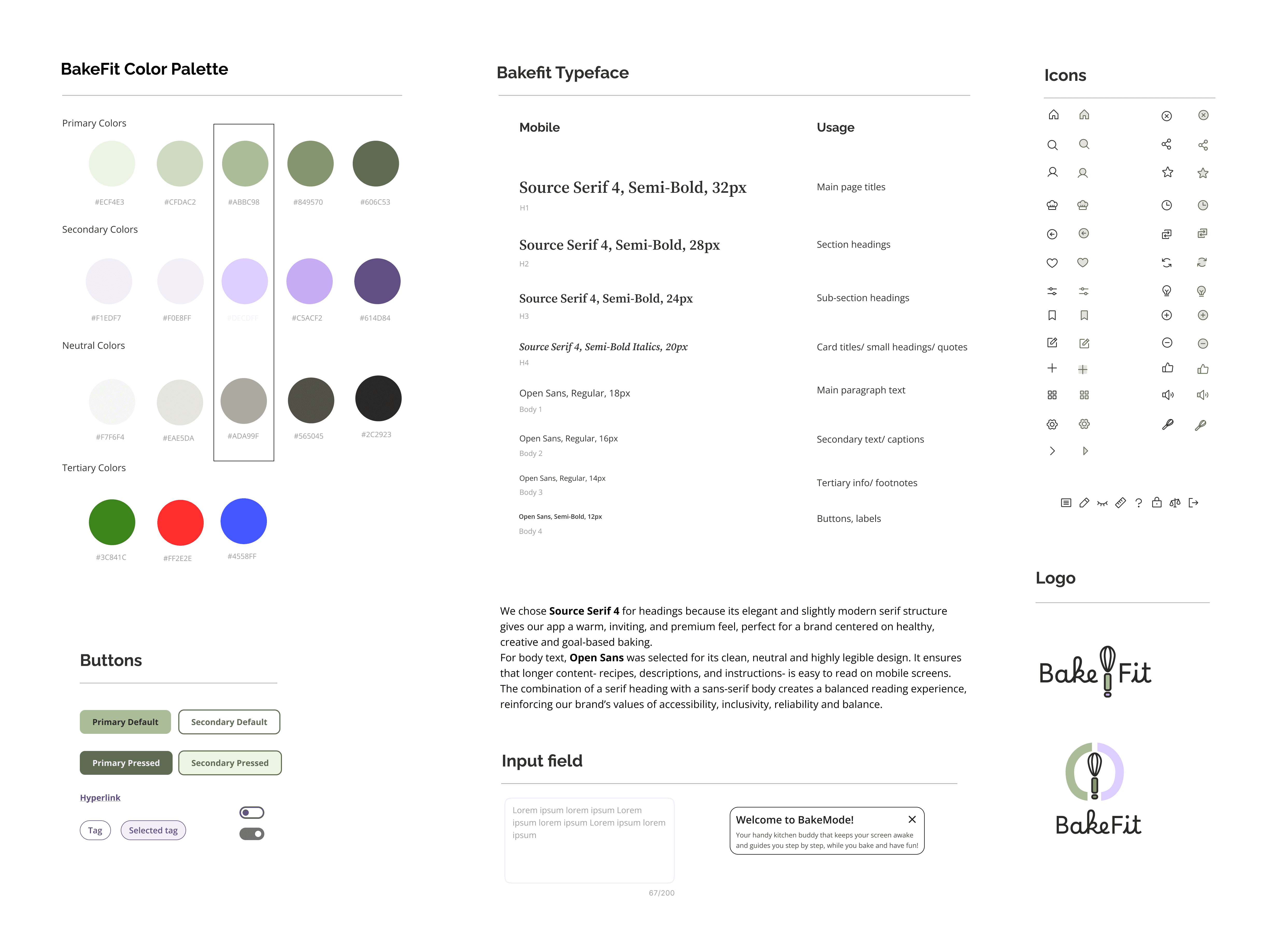
BakeFit's Style Tile
05 - Designs and Testing [Round 2]
The Final Act: High-Fidelity & Real-World Testing
05 - Designs and Testing [Round 2]
The Final Act: High-Fidelity & Real-World Testing
05 - Designs and Testing [Round 2]
The Final Act: High-Fidelity & Real-World Testing
Building the System, Then Bringing It to Life
Hi-Fi Screens
I created a UI Component Library and Properties for buttons and button states, cards, navigation, progress bars etc.
Then I built the high-fidelity prototype - animations, transitions, and functional flows. Using Figma Mirror, I simulated the mobile experience to see how it actually felt in-hand.
Building the System, Then Bringing It to Life
Hi-Fi Screens
I created a UI Component Library and Properties for buttons and button states, cards, navigation, progress bars etc.
Then I built the high-fidelity prototype - animations, transitions, and functional flows. Using Figma Mirror, I simulated the mobile experience to see how it actually felt in-hand.
Building the System, Then Bringing It to Life
Hi-Fi Screens
I created a UI Component Library and Properties for buttons and button states, cards, navigation, progress bars etc.
Then I built the high-fidelity prototype - animations, transitions, and functional flows. Using Figma Mirror, I simulated the mobile experience to see how it actually felt in-hand.
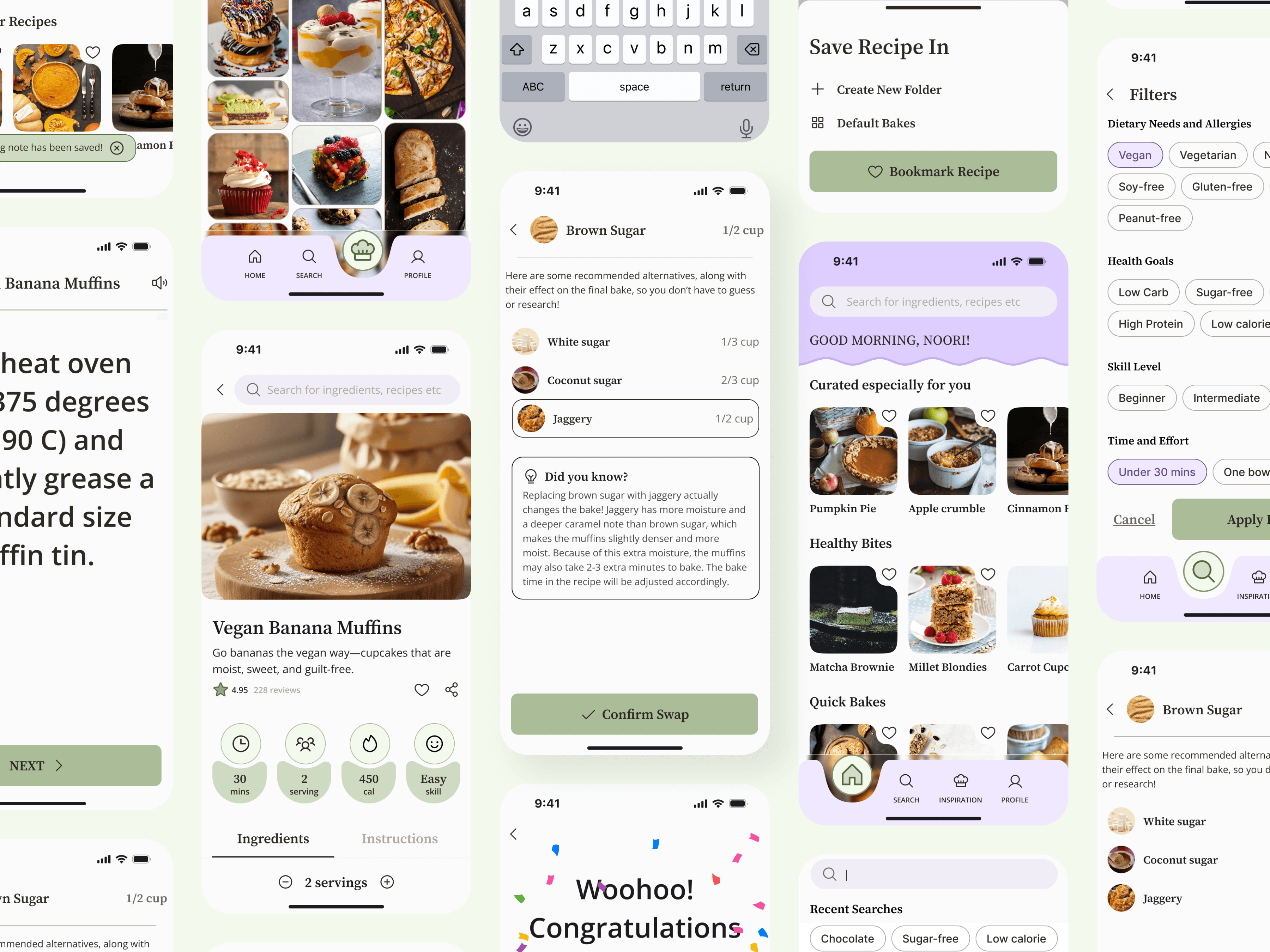
Some final high fidelity screens
Watching Real Users Navigate Our Designs
Usability Testing
To validate our designs, I conducted Remote Moderated Usability Testing on Google Meet across the core flows.
6 users participated.
The following flows were tested -
1. Search for a recipe
2. Filter and select a recipe
3. Swap an ingredient for a healthier alternative
4. Read the recipe overview and bake in Bakemode
5. Save a baking tip for future reference
6. Save the recipe in a customized folder for easy retrieval.
Watching Real Users Navigate Our Designs
Usability Testing
To validate our designs, I conducted Remote Moderated Usability Testing on Google Meet across the core flows.
6 users participated.
The following flows were tested -
1. Search for a recipe
2. Filter and select a recipe
3. Swap an ingredient for a healthier alternative
4. Read the recipe overview and bake in Bakemode
5. Save a baking tip for future reference
6. Save the recipe in a customized folder for easy retrieval.
Watching Real Users Navigate Our Designs
Usability Testing
To validate our designs, I conducted Remote Moderated Usability Testing on Google Meet across the core flows.
6 users participated.
The following flows were tested -
1. Search for a recipe
2. Filter and select a recipe
3. Swap an ingredient for a healthier alternative
4. Read the recipe overview and bake in Bakemode
5. Save a baking tip for future reference
6. Save the recipe in a customized folder for easy retrieval.
Where Users Struggled
Opportunities
Was everything perfect? NO!
Here are the Top 3 recurring themes where the users stumbled.
Where Users Struggled
Opportunities
Was everything perfect? NO!
Here are the Top 3 recurring themes where the users stumbled.
Where Users Struggled
Opportunities
Was everything perfect? NO!
Here are the Top 3 recurring themes where the users stumbled.
01 - Missing Labels
The chef cap icon in the Nav Bar confused 16% of testers who couldn't identify its purpose without text labels.
I swallowed my pride and added labels to the nav bar. Yes, it looked pretty but
usability > aesthetics always.
02 - Scanability Issues
Users couldn't quickly spot ingredients in BakeMode instructions and had no visual confirmation that ingredient swaps were successfully applied.
I highlighted swapped ingredients and improved BakeMode's ingredient color for better visual scanning.
03 - Visual Density
Margins felt cramped and images appeared cluttered, making screens feel crowded and reducing readability.
I increased spacing and margins to provide enough breathing room and improve readability.
What Worked (Really Well!)
Successes
The results were clear - overall sentiment toward the design was positive. Participants found the overall interface pretty intuitive, clean and user-friendly.
What Worked (Really Well!)
Successes
The results were clear - overall sentiment toward the design was positive. Participants found the overall interface pretty intuitive, clean and user-friendly.
What Worked (Really Well!)
Successes
The results were clear - overall sentiment toward the design was positive. Participants found the overall interface pretty intuitive, clean and user-friendly.
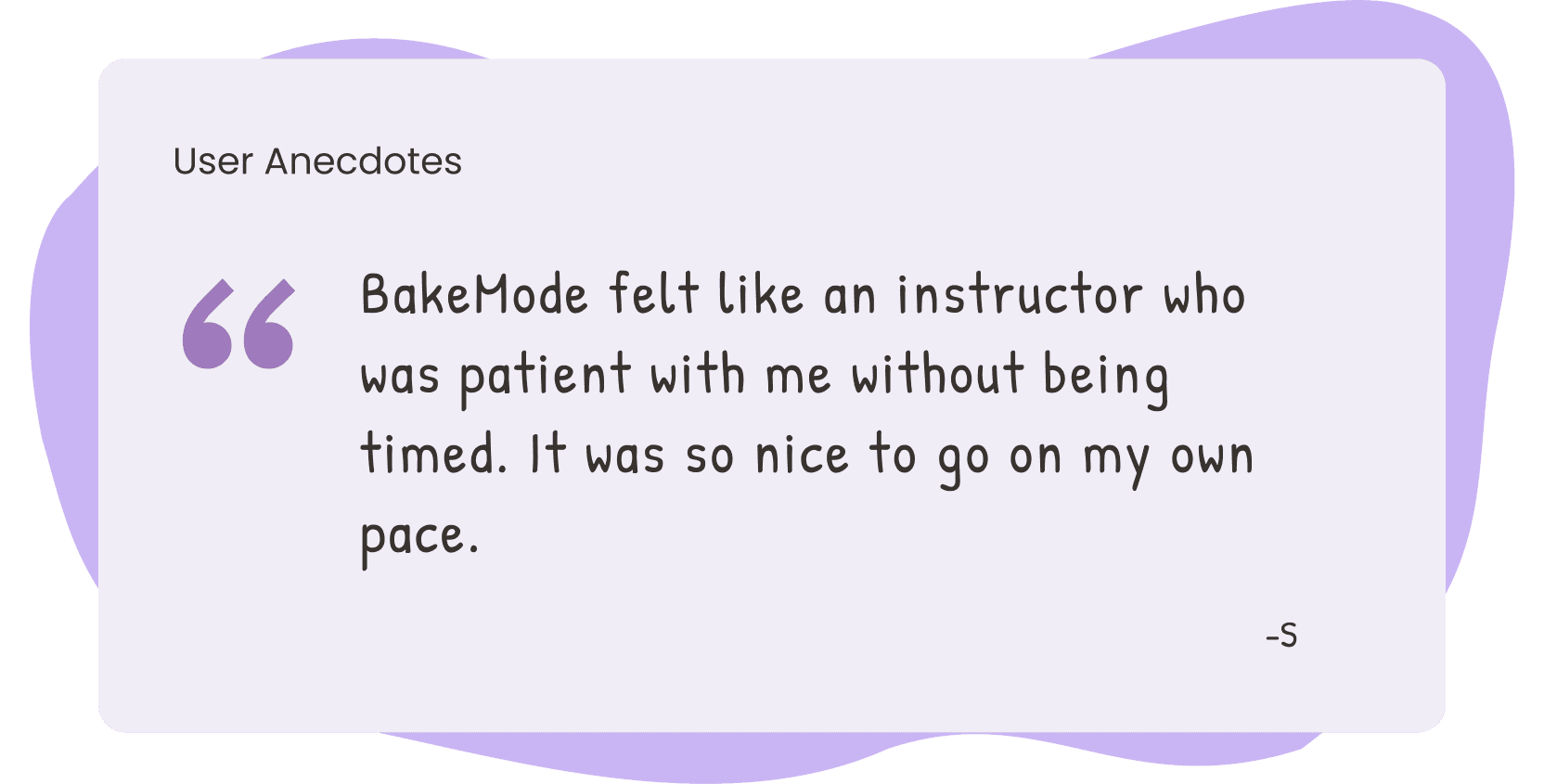
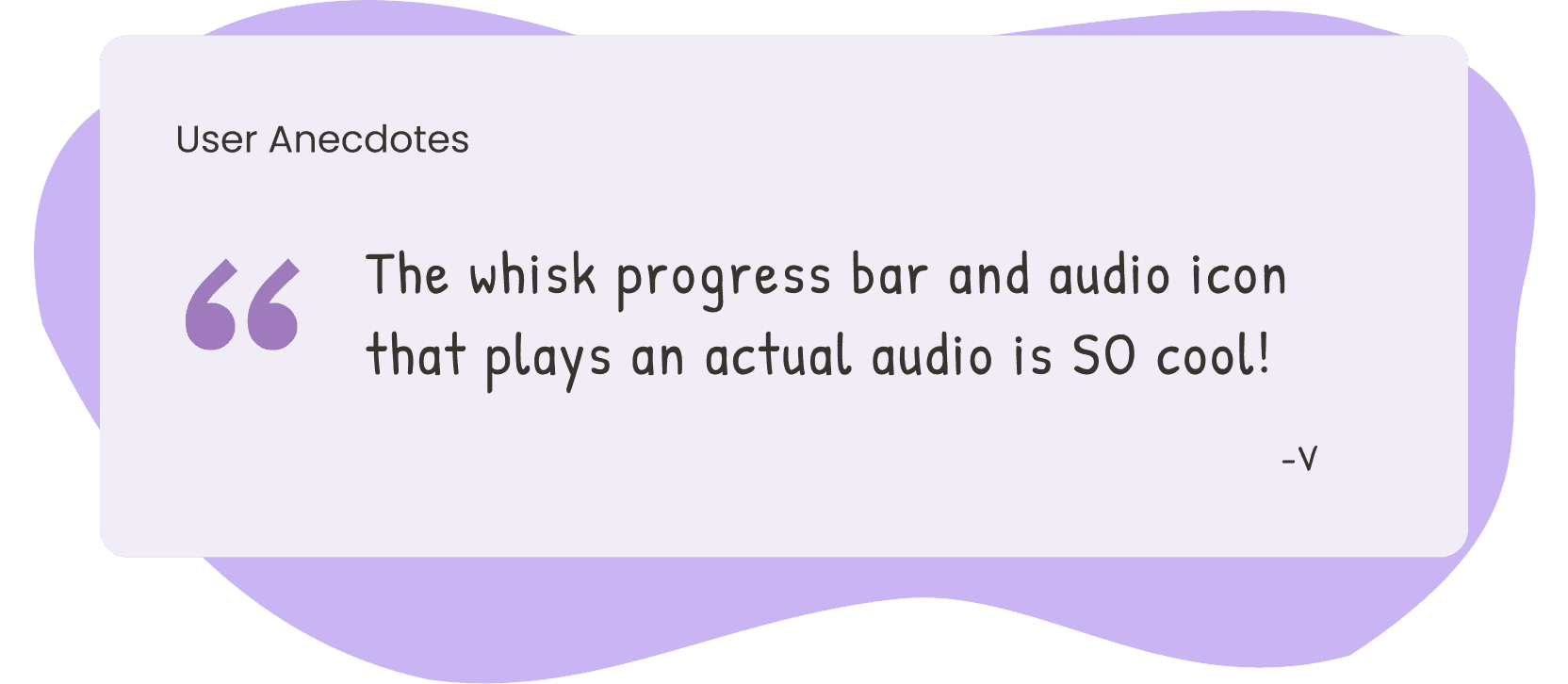
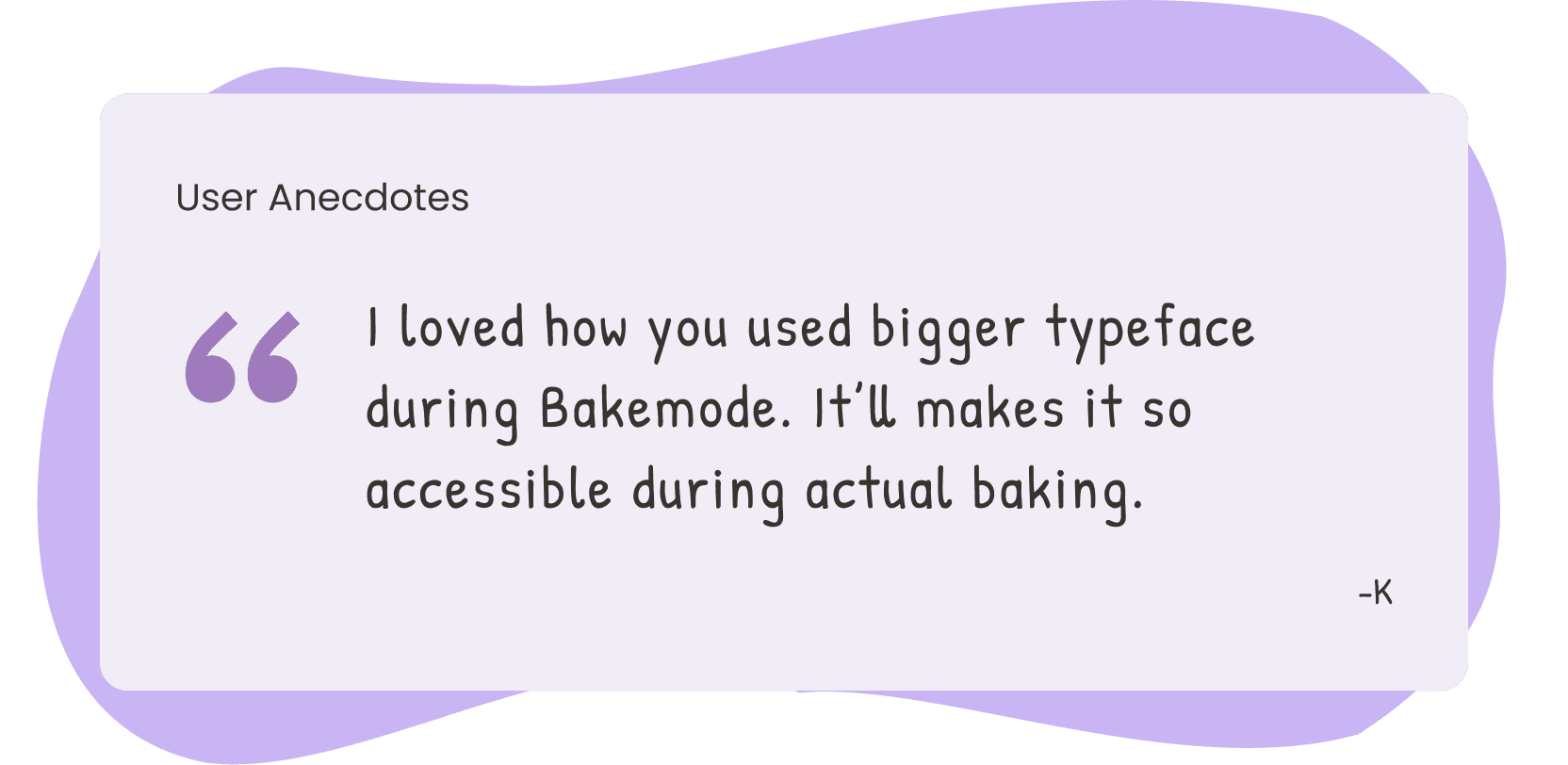
100%
Completion Rate in 6 out of 6 Flows
Completion Rate in 6 out of 6 Flows
4.7/5
Average Ease of Use
Average Ease of Use
100%
Users loved the BakeMode
Users loved the BakeMode
06 - Final Prototype
From Chaos to Confidence - The BakeFit Experience
06 - Final Prototype
From Chaos to Confidence - The BakeFit Experience
06 - Final Prototype
From Chaos to Confidence - The BakeFit Experience
Where Everything Comes Together
The Final Prototype
The final prototype transforms the messy reality of healthy baking into a seamless, joyful experience. Every feature - from goal-based recipe discovery and smart ingredient swaps to flexible BakeMode with audio guidance - was designed and refined based on real user needs and testing.
It's more than a baking app; it's a companion that makes health-conscious baking accessible, confident, and delightful.
Where Everything Comes Together
The Final Prototype
The final prototype transforms the messy reality of healthy baking into a seamless, joyful experience. Every feature - from goal-based recipe discovery and smart ingredient swaps to flexible BakeMode with audio guidance - was designed and refined based on real user needs and testing.
It's more than a baking app; it's a companion that makes health-conscious baking accessible, confident, and delightful.
Where Everything Comes Together
The Final Prototype
The final prototype transforms the messy reality of healthy baking into a seamless, joyful experience. Every feature - from goal-based recipe discovery and smart ingredient swaps to flexible BakeMode with audio guidance - was designed and refined based on real user needs and testing.
It's more than a baking app; it's a companion that makes health-conscious baking accessible, confident, and delightful.
Goal-Based Recipe Discovery
Goal-Based Recipe Discovery
Goal-Based Recipe Discovery
Search by ingredient you have
Filter by diet, health goals, skill level & time
Discover matches without endless scrolling
Search by ingredient you have
Filter by diet, health goals, skill level & time
Discover matches without endless scrolling


Smart Swaps & Accessible Bakemode
Smart Swaps & Accessible Bakemode
Smart Swaps & Accessible Bakemode
Swap ingredients, preview recipe impact
Activate BakeMode for accessible, step-by-step guidance
Bake with audio and progress tracking
Swap ingredients, preview recipe impact
Activate BakeMode for accessible, step-by-step guidance
Bake with audio and progress tracking
Save Tips & Organize Your Collection
Save Tips & Organize Your Collection
Save Tips & Organize Your Collection
Save baking tips for next time
Organize recipe into custom folder
Search within organized recipes for easy retrieval
Save baking tips for next time
Organize recipe into custom folder
Search within organized recipes for easy retrieval
07 - Reflection and Learnings
Growing as a Designer Through Fast Feedback
07 - Reflection and Learnings
Growing as a Designer Through Fast Feedback
07 - Reflection and Learnings
Growing as a Designer Through Fast Feedback
What I Strengthened
Designing for real context - messy kitchens, greasy hands and chaos.
Time management and scope control - especially while working under a strict 100-hour constraint.
Prioritization skills - wrt feature development and iterations, rather than implementing every suggestion.
AI in Workflows - Incorporating AI as a brainstorming partner (not a replacement) accelerated my process.
What I'd do differently
Diversity - Although I designed for accessibility, I'd love to recruit more diverse testers. Inclusivity should be a measurable outcome, not just a checkbox.
Test on multiple devices - I prototyped for iOS, but real users have all kinds of screen sizes and Android phones too.
Involve developers - Some of my ideas might be technically complex. Getting real feasibility feedback would've refined the MVP better.
What's next for BakeFit?
Future Iterations
This is just V1. Future iterations could include -
Hands-free BakeMode with voice commands and gesture control
AI conversational assistant for real-time baking help
Smart pantry integration to suggest recipes based on what you already have
Enhanced goal tracking to keep users motivated and accountable
What's next for BakeFit?
Future Iterations
This is just V1. Future iterations could include -
Hands-free BakeMode with voice commands and gesture control
AI conversational assistant for real-time baking help
Smart pantry integration to suggest recipes based on what you already have
Enhanced goal tracking to keep users motivated and accountable
What's next for BakeFit?
Future Iterations
This is just V1. Future iterations could include -
Hands-free BakeMode with voice commands and gesture control
AI conversational assistant for real-time baking help
Smart pantry integration to suggest recipes based on what you already have
Enhanced goal tracking to keep users motivated and accountable
View Other Case Studies >
View Other Case Studies >
View Other Case Studies >
Liked what you saw? Let's connect and build something awesome together!
© Shivangi Gupta | 2026
[ Fueled by Filter Coffee and Framer ]
Liked what you saw? Let's connect and build something awesome together!
© Shivangi Gupta | 2026
[ Fueled by Filter Coffee and Framer ]
Liked what you saw? Let's connect and build something awesome together!
© Shivangi Gupta | 2026
[ Fueled by Filter Coffee and Framer ]